AvS_ScopeHint for Magento 2
avstudnitz/scopehint2 67
This extension displays a hint when a configuration value is overwritten on a lower scope (website or store view).
Build Tests
Code Quality
Release Discipline
Release history audited up to v1.3.5
Tested on Magento 2.4.9
Recent Test History
Each release is tested against the latest Magento version at that time.
+7 older tests
Top Contributors
View Leaderboard


Share This Module's Status
README
Loaded from GitHubAvS_ScopeHint for Magento 2
Displays a hint when a configuration value is overwritten on a lower scope (website or store view).
Facts
- extension on GitHub
- direct download link
- Composer key:
avstudnitz/scopehint2(registered at Packagist)
Description
Whenever a configuration setting is overwritten by a lower level website or store view, an icon is displayed. On Mouseover, a list of all stores / websites which overwrite the setting is shown with the respective values. See the screenshot to get an impression of what the module does:
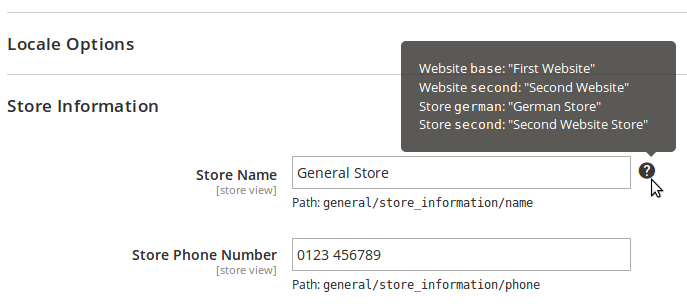
The module also optionally displays the configuration code (which is used for ScopeConfigInterface::getValue()) with the configuration fields.
This is on by default, and can be enabled/disabled in
Stores -> Settings -> Configuration -> Advanced -> Developer -> Debug -> Display path for each option in system configuration
Requirements
- PHP >= 5.6.0
Compatibility
- Magento >= 2.1.0 (not tested on 2.0.x)
Installation Instructions
Via Composer:
- Call
composer require avstudnitz/scopehint2in your Magento root dir from the command line
Via Download
- Copy all the files into the newly created directory
app/code/AvS/ScopeHint/in the Magento 2 root.
In both cases:
- Enable the extension by calling
bin/magento module:enable AvS_ScopeHint. - Run
bin/magento setup:upgrade.
Uninstallation
- Uninstall the extension by calling
bin/magento module:uninstall AvS_ScopeHint. - Remove all extension files from
app/code/AvS/ScopeHint/or use Composer to remove the extension if you have installed it with Composer
Support
If you have any issues with this extension, open an issue on GitHub.
Contribution
Any contribution is highly appreciated. The best way to contribute code is to open a pull request on GitHub.
Developer
Andreas von Studnitz
Licence
OSL - Open Software Licence 3.0
Copyright
(c) 2017-2024 Andreas von Studnitz
This content is fetched directly from the module's GitHub repository. We are not the authors of this content and take no responsibility for its accuracy, completeness, or any consequences arising from its use.