Build Tests
Code Quality
Release Discipline
Release history audited up to v0.9.0
Tested on Magento 2.4.9
Recent Test History
Each release is tested against the latest Magento version at that time.
+14 older tests
Top Contributors
View Leaderboard


Share This Module's Status
README
Loaded from GitHubLoki_AdminComponents
This Magento 2 module allows for developers to build admin grids and admin forms in the Magento 2 Admin Panel in a faster way. No more ugly UiComponents that nobody understands. Create grids and forms quickly. And gradually add features to them, without getting stuck.
The LokiAdminComponents are based on the Loki Components module which is also used in the LokiCheckout. However, this admin tool shows that the Loki Extension suite can be applied in many more places.
Note that this library makes use of Alpine.js in the Magento Admin Panel. As for CSS, we stick to the native Magento Admin Panel classes instead: Everything looks the same.
Installation
composer require loki/magento2-admin-components
bin/magento module:enable Loki_AdminComponents Loki_Components Loki_CssUtils Loki_Base
Getting started with a grid
First create a module that generates a page in the Admin Panel (etc/module.xml, registration.php, a backend controller action class, perhaps acl.xml and menu.xml).
In your new XML layout file, add the following:
<?xml version="1.0"?>
<page xmlns:xsi="http://www.w3.org/2001/XMLSchema-instance" xsi:noNamespaceSchemaLocation="urn:magento:module:View/Layout:etc/page_configuration.xsd">
    <update handle="loki_admin_components_grid"/>

    <body>
        <referenceContainer name="content">
            <block
                name="yireo-training.example-admin.grid"
                template="Loki_AdminComponents::grid.phtml">
                <arguments>
                    <argument name="provider" xsi:type="string">
                        Magento\Catalog\Api\ProductRepositoryInterface
                    </argument>
                </arguments>
            </block>
        </referenceContainer>
    </body>
</page>
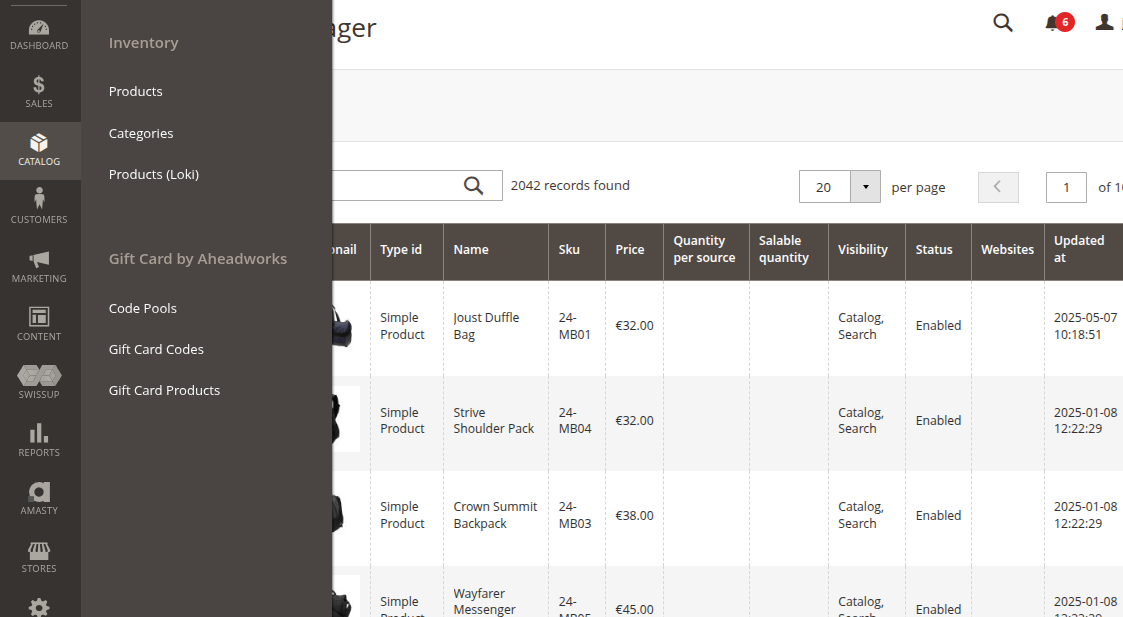
And you're done. After refreshing the Magento cache, you now have a product grid.
Refer to the documentation for fine-tuning this grid.
Getting started with a form
Again, first create a module that generates a page in the Admin Panel (etc/module.xml, registration.php, a backend controller action class, perhaps acl.xml and menu.xml).
In your new XML layout file, add the following:
<?xml version="1.0"?>
<page xmlns:xsi="http://www.w3.org/2001/XMLSchema-instance" xsi:noNamespaceSchemaLocation="urn:magento:module:View/Layout:etc/page_configuration.xsd">
    <update handle="loki_admin_components_form"/>

    <body>
        <referenceContainer name="content">
            <block
                name="yireo-training.example-admin.form"
                template="Loki_AdminComponents::form.phtml">
                <arguments>
                    <argument name="provider" xsi:type="string">
                        Magento\Catalog\Api\ProductRepositoryInterface
                    </argument>
                </arguments>
            </block>
        </referenceContainer>
    </body>
</page>
And you're done. After refreshing the Magento cache, you now have a basic product form.
Refer to the documentation for fine-tuning this form.
Permissions (ACL)
Every AJAX request of a grid or form requires an admin login. Use the following block arguments to require extra ACL resources:
acl_resource: Required for every request of the component (viewing, searching, saving);save_acl_resource: Required for the form actionssaveandduplicateand for inline editing in a grid;delete_acl_resource: Required for the form actiondelete;
Buttons of actions that the current admin user is not allowed to perform (like Delete) are hidden. Mass actions and cell actions point to your own controllers, so protect those via their ADMIN_RESOURCE.
<argument name="acl_resource" xsi:type="string">Vendor_Module::items</argument>
<argument name="save_acl_resource" xsi:type="string">Vendor_Module::items_save</argument>
<argument name="delete_acl_resource" xsi:type="string">Vendor_Module::items_delete</argument>
Examples
As a demo, you could opt to install the following examples:
- YireoTraining_ExampleLokiAdminProducts - a product repository-based grid with various modifications including inline editing of the product name;
- YireoTraining_ExampleLokiAdminCmsPage - a bare-bones repository-based implementation that is ugly, but it shows what you get with minimal effort;
- YireoTraining_ExampleLokiAdminArrayGrid - a bare-bones array-based grid;
- YireoTraining_YireoTraining_ExampleLokiAdminEavEntityType - a bare-bones collection-based grid to display EAV entity types;
Features
Grid features
- Autodetection of columns
- Search
- Pagination
- Sorting columns
- Custom cell templates
- Inline editing
- Filters
- Mass Actions
- Custom cell templates
- ... (more docs coming soon)
Grid provider handlers
repositorycollectionarray
Form features
- Autodetection of columns
- Field-types (
select,input,number,datetime, etc) with option to configure more - Form actions (*Back, Save and Close, Save and Continue, Delete, etc)
- ... (more docs coming soon)
Documentation
See https://loki-extensions.com/docs/admin-components
Todo
- Extension Attributes
- Filesystem navigation
- Tiles instead of grid layout
- Delete add confirmation
- Add custom SearchCriteriaBuilder via repository addons
- Switch field for enabled/disabled column within grid
- Export selected to CSV, JSON, XSLX
Current status
This content is fetched directly from the module's GitHub repository. We are not the authors of this content and take no responsibility for its accuracy, completeness, or any consequences arising from its use.