Monsoon PWA
monsoonconsulting/magento2-pwa 18
Enables Magento 2 as a Progressive Web App (PWA) by adding necessary icons, manifest, and service worker files. Supports offline page configuration and "Add to Home screen" prompt.
Build Tests
Code Quality
Release Discipline
Release history audited up to v1.2.1
Tested on Magento 2.4.9
Recent Test History
Each release is tested against the latest Magento version at that time.
Top Contributors
View Leaderboard


Looking for Contributors
Composer installation fails. Your contribution could help the entire Magento community!
Share This Module's Status
README
Loaded from GitHubMonsoon PWA
Adds icons, a web manifest file and a service-worker file to make magento 2 a PWA.
Installation
composer require monsoonconsulting/magento2-pwa
Main Features
- Supports Magento Blank and Luma as well as Hyvä based themes. ⚠️ Hyvä is recommended to ensure fast performance.
- Makes Magento Installable as a PWA.
- A CMS Page can be configured for an offline page.
- Add to Home screen prompt
- Enable/Disable Offline Google Analytics.
- Utilises the Browser's Cache API.
- Service worker lifecycle management.
Configuration
To configure the module go to Stores > Configuration > Monsoon > PWA.
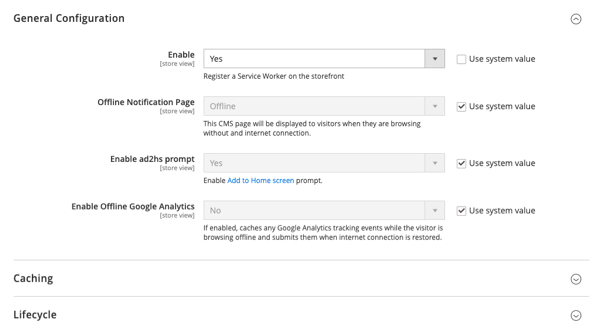
Offline Page
In Stores > Configuration > Monsoon > PWA select the page you wish to use as your offline notification page. Alternatively use the default one provided by this module.
Customisation
In your Magento theme, override the images and PWA app details found in:
- Monsoon/Pwa/view/frontend/web/images/favicons
- Monsoon/Pwa/view/frontend/web/manifest.icon
For generating the correct icons there are useful tools such as a favicon generator and maskable icon editor.
Configure Service Worker
Most PWA features can be adjusted/added in the service-worker file.
- Simply override
Monsoon_Pwa/view/frontend/templates/service-worker.js.phtmlin your theme to customise.
OR - To extend add your custom JavaScript to a PHTML file and add it to the service worker via
Magento's LayoutXML in, by extending the
serviceworker_index_js.xmlfile to include your code.
This content is fetched directly from the module's GitHub repository. We are not the authors of this content and take no responsibility for its accuracy, completeness, or any consequences arising from its use.