Build Tests
Code Quality
Release Discipline
Release history audited up to v1.1.7
Tested on Magento 2.4.9
Recent Test History
Each release is tested against the latest Magento version at that time.
Top Contributors
View Leaderboard
Share This Module's Status
README
Loaded from GitHubRollpix_DisableSales
SPONSOR: www.rollpix.com
Magento 2 module to temporarily disable sales in an online store without affecting catalog navigation. Ideal for high-demand situations, maintenance, or when you need to pause purchases without taking the site down.
Supports restricting sales by customer group, so you can block purchases for specific groups while allowing others to continue buying.
Compatibility
| Requirement | Supported versions |
|---|---|
| PHP | 7.4 ~ 8.3 |
| Magento | 2.4.x (Open Source / Commerce) |
Installation
Via composer (recommended)
composer require rollpix/module-disable-sales
bin/magento module:enable Rollpix_DisableSales
bin/magento setup:upgrade
bin/magento cache:flush
Manual
- Create the folder
app/code/Rollpix/DisableSalesin your Magento installation. - Copy all files from this repository into that folder.
- Run:
bin/magento module:enable Rollpix_DisableSales
bin/magento setup:upgrade
bin/magento cache:flush
Admin Configuration
Go to Stores > Configuration > Rollpix > Disable Sales.
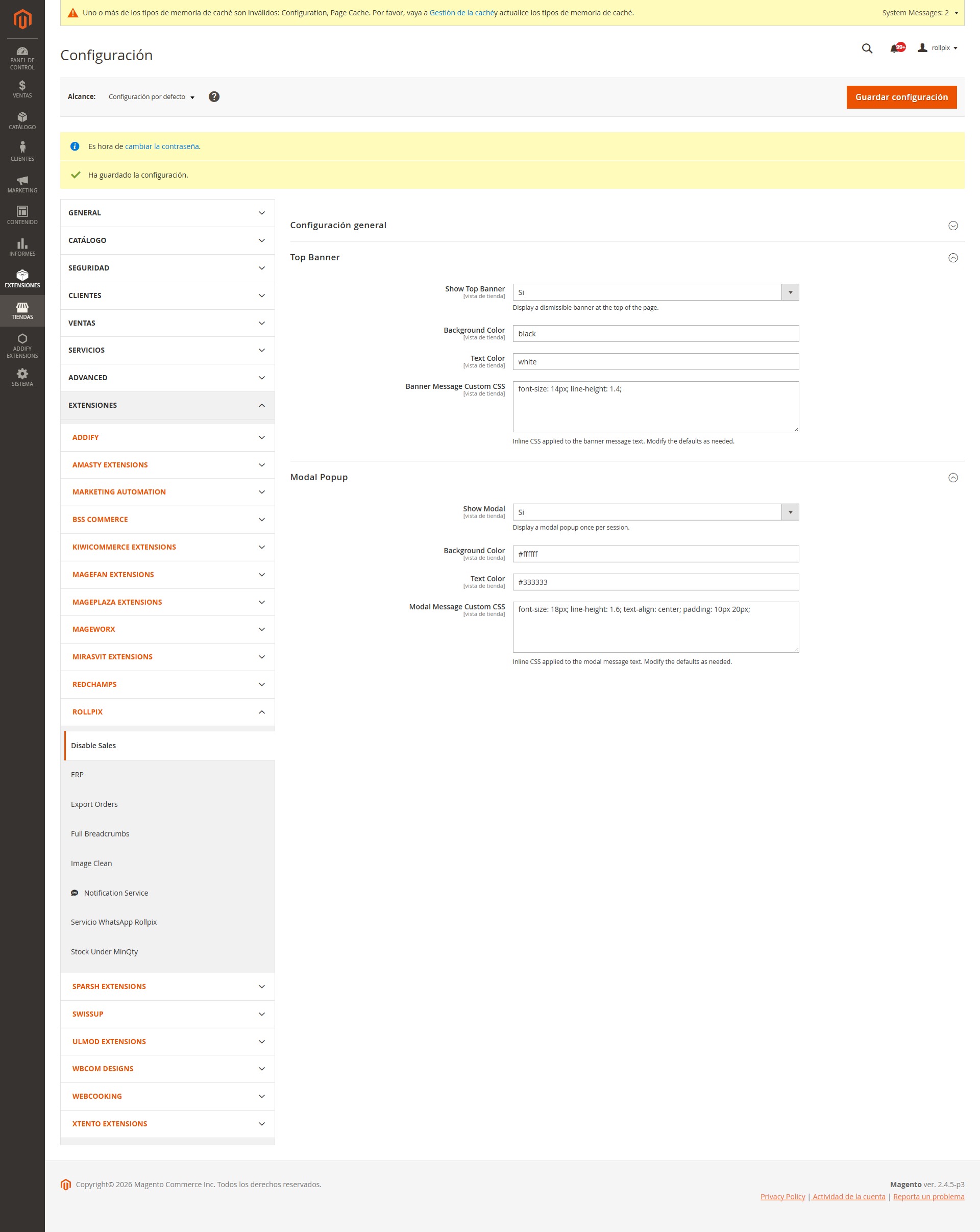
Configuration is divided into three sections:
General Settings
| Field | Type | Default | Description |
|---|---|---|---|
| Enable | Yes/No | No | Activate or deactivate sales blocking |
| Message | Textarea | (see below) | Message shown to customers. Supports HTML in the banner and modal. Checkout/cart error messages display as plain text |
| Also Disable Checkout | Yes/No | Yes | Block checkout access as an additional safety net |
| Restrict to Customer Groups | Multiselect | (empty) | Select which customer groups are restricted. If empty, all groups are restricted (backward compatible). Includes "NOT LOGGED IN" for guest users |
Default message:
Debido a la alta demanda, las compras estan temporalmente suspendidas. Podes seguir navegando el catalogo. Volve pronto!
The message field supports HTML. You can use <strong>, <br>, <a href="...">, etc. HTML renders in the top banner and modal. Error messages shown in checkout and cart (via Magento message manager) automatically display as plain text.
Customer Group Filtering
When one or more customer groups are selected:
- Only those groups will have sales disabled. Other groups can purchase normally.
- The frontend uses JavaScript (via Magento's
customerData) to determine the customer's group and show/hide add-to-cart buttons and notifications dynamically. This is fully compatible with Full Page Cache (FPC). - If "NOT LOGGED IN" (group 0) is selected, guests will see buttons hidden and the banner/modal (if enabled).
- Server-side plugins always enforce the restriction regardless of frontend behavior.
When no groups are selected (empty), the module works in legacy mode: sales are disabled for everyone using server-side CSS, identical to v1.0.x behavior.
Top Banner
| Field | Type | Default | Description |
|---|---|---|---|
| Show Top Banner | Yes/No | Yes | Display a dismissible banner at the top of the page |
| Show Only After Login | Yes/No | No | Only show the banner after the customer logs in. Guests won't see it even if their group is restricted |
| Background Color | Color | #ff6b35 |
Banner background color (hex format) |
| Text Color | Color | #ffffff |
Banner text color (hex format) |
| Banner Message Custom CSS | Textarea | font-size: 14px; line-height: 1.4; |
Inline CSS applied to the message text. Pre-loaded with defaults for easy editing |
The banner has a close button (X). Once closed, it won't show again in that browser session (uses localStorage). The dismissed state resets automatically when the customer logs in or out.
Modal Popup
| Field | Type | Default | Description |
|---|---|---|---|
| Show Modal | Yes/No | No | Display a modal popup once per session |
| Show Only After Login | Yes/No | No | Only show the modal after the customer logs in |
| Background Color | Color | #ffffff |
Modal background color |
| Text Color | Color | #333333 |
Modal text color |
| Modal Message Custom CSS | Textarea | font-size: 18px; line-height: 1.6; text-align: center; padding: 10px 20px; |
Inline CSS applied to the modal message text. Pre-loaded with defaults |
The modal is displayed centered on screen, with a max-width of 600px. It appears once per browser session (uses sessionStorage). Includes an "Entendido" (Got it) button to close.
Banner and Modal can be active at the same time. They are independent of each other.
What the module does when active
1. Hides "Add to Cart" buttons
Without group filter (legacy mode): Conditional inline CSS hides .action.tocart and #product-addtocart-button buttons on all pages.
With group filter: JavaScript dynamically injects/removes a <style> tag based on the customer's group (determined via customerData). This approach is FPC-compatible.
Affected pages:
- Category listing pages
- Product pages
- Search results
- Product widgets
2. Blocks add-to-cart (backend)
First layer: around plugin on Magento\Checkout\Controller\Cart\Add::execute
- Checks the customer's group against the restricted list
- AJAX requests: responds with HTTP 400 JSON containing the configured message
- Standard requests: redirects to referer with error message in message manager
Second layer: before plugin on Magento\Quote\Model\Quote::addProduct
- Checks the quote's customer group against the restricted list
- Throws
LocalizedExceptionwith the message (plain text) - Covers any entry point using the Quote model directly
3. Blocks checkout (optional)
If "Also Disable Checkout" is set to Yes:
aroundplugin onMagento\Checkout\Controller\Index\Index::executearoundplugin onMagento\Checkout\Controller\Onepage\Index::execute- Checks the customer's group before blocking
- Redirects to cart with error message
4. Blocks REST API / GraphQL
before plugin on Magento\Quote\Api\CartItemRepositoryInterface::save
- Loads the quote to determine customer group
- Throws
LocalizedExceptionblocking item creation via API for restricted groups
5. Visual notification
Displays the configured message to users via:
- Top banner: fixed at the top, dismissible, customizable colors and CSS
- Modal popup: centered on screen, appears once per session, with "Got it" button
Both support the "Show Only After Login" option and customer group filtering.
Behavior when disabled
When Enable = No:
- No plugin logic is executed (immediate early return)
- No CSS or JS is injected
- Banner and modal templates are not rendered
- Performance impact: zero
The module is 100% reversible: simply set Enable = No and flush cache, everything returns to normal. No database tables are modified, no crons or observers are created.
Technical architecture
File structure
rollpix/module-disable-sales/   (repo root)
├── registration.php
├── composer.json
├── etc/
│   ├── module.xml
│   ├── di.xml                          # Global plugins (API, Quote)
│   ├── config.xml                      # Default values
│   ├── acl.xml                         # ACL resource
│   ├── frontend/
│   │   └── di.xml                      # Frontend plugins (Cart, Checkout, CustomerData)
│   └── adminhtml/
│       └── system.xml                  # Admin configuration
├── i18n/
│   └── es_AR.csv                       # Spanish (Argentina) translation
├── Model/
│   ├── Config.php                      # Config reading via ScopeConfig
│   └── Config/
│       └── Source/
│           └── CustomerGroup.php       # Source model for customer group multiselect
├── Plugin/
│   ├── Cart/
│   │   └── AddPlugin.php              # Blocks Cart\Add::execute
│   ├── Quote/
│   │   └── AddProductPlugin.php       # Blocks Quote::addProduct
│   ├── Checkout/
│   │   └── DisableCheckoutPlugin.php  # Blocks checkout access
│   ├── Api/
│   │   └── CartItemRepositoryPlugin.php # Blocks REST API/GraphQL
│   └── CustomerData/
│       └── CustomerPlugin.php          # Adds group_id to customer section data
├── ViewModel/
│   └── SalesStatus.php                # Exposes config to frontend
├── view/
│   └── frontend/
│       ├── layout/
│       │   └── default.xml            # Injects blocks on all pages
│       ├── templates/
│       │   ├── banner.phtml           # Top banner template (two-mode rendering)
│       │   └── modal.phtml            # Modal popup template (two-mode rendering)
│       └── web/
│           └── js/
│               ├── disable-sales-modal.js        # Modal JS (RequireJS)
│               └── disable-sales-group-filter.js  # Group-based restriction JS
└── README.md
Plugins
| Plugin | Type | Scope | Intercepted class |
|---|---|---|---|
| AddPlugin | around | frontend | Magento\Checkout\Controller\Cart\Add |
| AddProductPlugin | before | global | Magento\Quote\Model\Quote |
| DisableCheckoutPlugin | around | frontend | Magento\Checkout\Controller\Index\Index / Onepage\Index |
| CartItemRepositoryPlugin | before | global | Magento\Quote\Api\CartItemRepositoryInterface |
| CustomerPlugin | after | frontend | Magento\Customer\CustomerData\Customer |
ViewModel
Rollpix\DisableSales\ViewModel\SalesStatus exposes to frontend:
isDisabled(): boolgetMessage(): stringisBannerEnabled()/isModalEnabled(): boolgetBannerBgColor()/getBannerTextColor()/getBannerCustomCss(): stringgetModalBgColor()/getModalTextColor()/getModalCustomCss(): stringhasCustomerGroupFilter(): boolgetRestrictedCustomerGroupsJson(): string (JSON array of group IDs)isBannerShowOnLogin()/isModalShowOnLogin(): bool
ACL
Resource: Rollpix_DisableSales::config under Magento_Config::config
Manual testing guide
Basic functionality
-
Enable the module in admin (Enable = Yes) → Save configuration → Flush cache
- Verify "Add to Cart" buttons disappear on category, product, and search pages
- Verify the top banner appears (if enabled)
- Verify the modal appears (if enabled)
-
Try adding to cart via direct URL (
/checkout/cart/add/product/ID/)- Verify it is blocked and shows the error message
-
Try accessing checkout with products in cart
- Verify it redirects to cart with error message
-
Disable the module (Enable = No) → Flush cache
- Verify everything returns to normal
Customer group filtering
-
Select specific groups (e.g., "General" and "NOT LOGGED IN") → Save → Flush cache
- As a guest: verify buttons are hidden and banner/modal appear
- Log in as a user in the "General" group: verify buttons are hidden
- Log in as a user in a non-restricted group (e.g., "Wholesale"): verify buttons are visible and no banner/modal
-
Test login/logout transitions
- Start as guest (restricted) → log in as non-restricted → verify buttons become visible without page refresh
- Start as guest (not restricted) → log in as restricted → verify buttons become hidden
-
Test "Show Only After Login" for banner and/or modal
- Enable the option → as guest, verify banner/modal don't appear
- Log in as a restricted user → verify banner/modal appear
Visual customization
-
Change message, colors and CSS → Flush cache
- Verify changes are reflected on the frontend
-
Test banner close button (X)
- Verify it doesn't show again when navigating (localStorage)
-
Test modal in incognito mode
- Verify it appears once and doesn't reappear in the session (sessionStorage)
-
Test banner + modal together
- Enable both and verify they coexist correctly
Uninstall
bin/magento module:disable Rollpix_DisableSales
bin/magento setup:upgrade
bin/magento cache:flush
If installed via composer, run composer remove rollpix/module-disable-sales.
If installed manually, remove the app/code/Rollpix/DisableSales folder.
No database tables are created or modified. No residue left behind.
License
MIT
This content is fetched directly from the module's GitHub repository. We are not the authors of this content and take no responsibility for its accuracy, completeness, or any consequences arising from its use.