SchrammelCodes_EpcQrCode
schrammel-codes/magento2-epc-qr-code 68
To ease payments for customers, merchants can provide an EPC QR code for banktransfer payments. This module adds new configurations to the Banktransfer payment method, which generates an EPC QR code for the customer to scan with their banking app.
Build Tests
Code Quality
Release Discipline
Release history audited up to v2.2.0
Tested on Magento 2.4.9
Recent Test History
Each release is tested against the latest Magento version at that time.
+7 older tests
Top Contributors
View Leaderboard


Share This Module's Status
README
Loaded from GitHubTable of contents
- 📝 Summary
- ℹ️ Background
- 👨🏼🔧 Installation
- 🛠️ Configuration
- 🗓️ Usage
- ⛙ Contribution
- ⬆️ Upgrade
- ⚖️ License
📝 Summary
To ease payments for customers, merchants can provide an EPC QR code for banktransfer payments.
This module adds new configurations to the Banktransfer payment method, which generates an EPC QR code for the
customer to scan with their banking app.
ℹ️ Background
EPC QR codes (PDF)
are a standardized way to provide payment information to customers. The generated QR code contains all the information
needed to make a banktransfer payment, such as the beneficiary, IBAN, the transaction amount and the reference.
The customers simply can scan the QR code with their banking app to initiate the payment.
👨🏼🔧 Installation
composer require schrammel-codes/magento2-epc-qr-code
bin/magento module:enable SchrammelCodes_EpcQrCode
bin/magento setup:upgrade
🛠️ Configuration
This module adds additional configurations to the Banktransfer payment method in
Stores > Configuration > Sales > Payment Methods > Bank Transfer Payment.
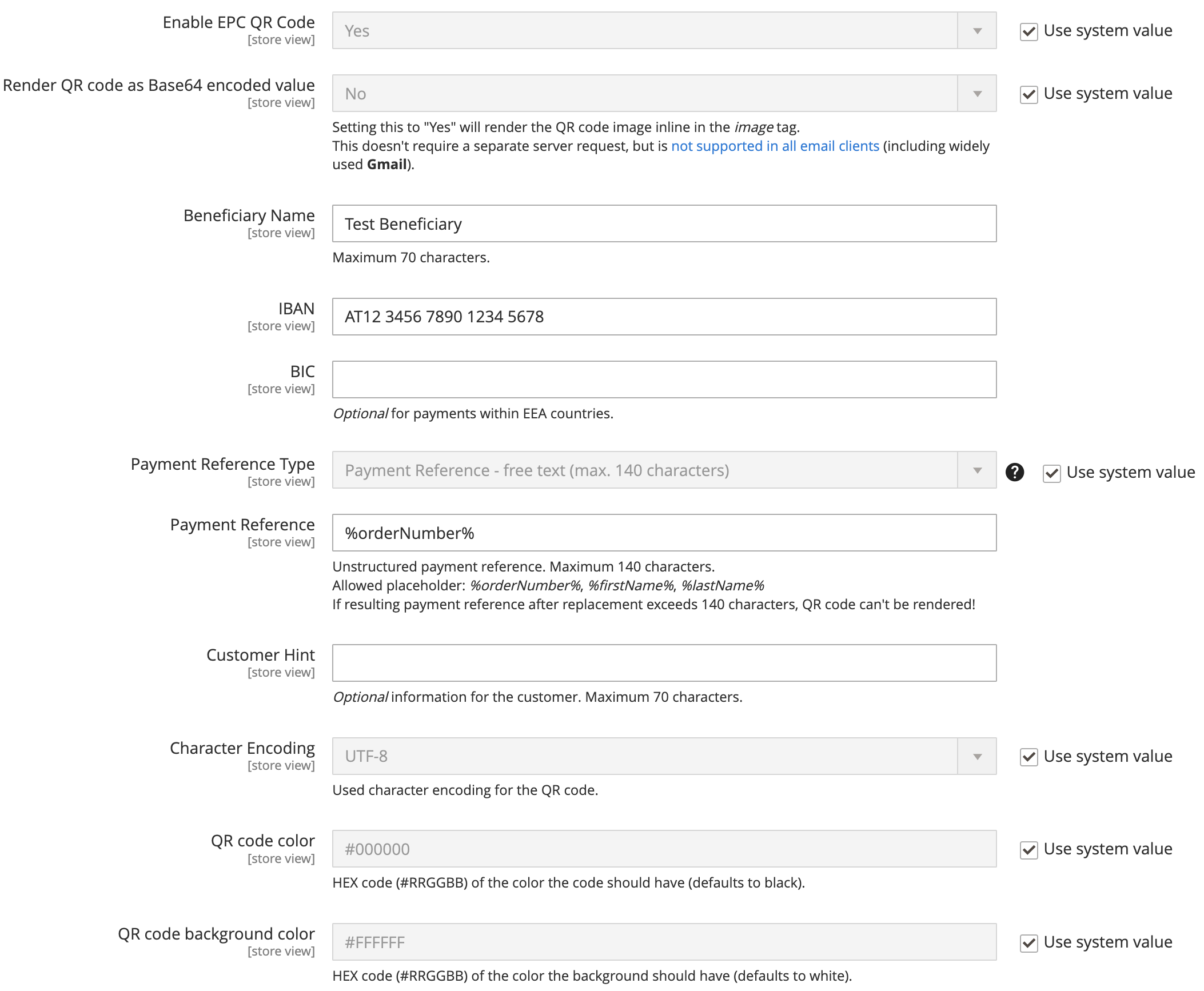
Render QR code as Base64 encoded value has to be used with caution. It is recommended to use this option only, if it's
that your customers don't get a QR code rendered in Gmail clients, as the most widely used email client not supporting
base64 encoded images as image source.
When using colors for your QR code, make sure it is easy to scan. Some color combinations might make it hard to impossible for the banking apps to process the QR code.
🗓️ Usage
As soon as the module is enabled and configured with correct information, the QR code will be rendered below the banktransfer payment instructions in every place they are rendered.
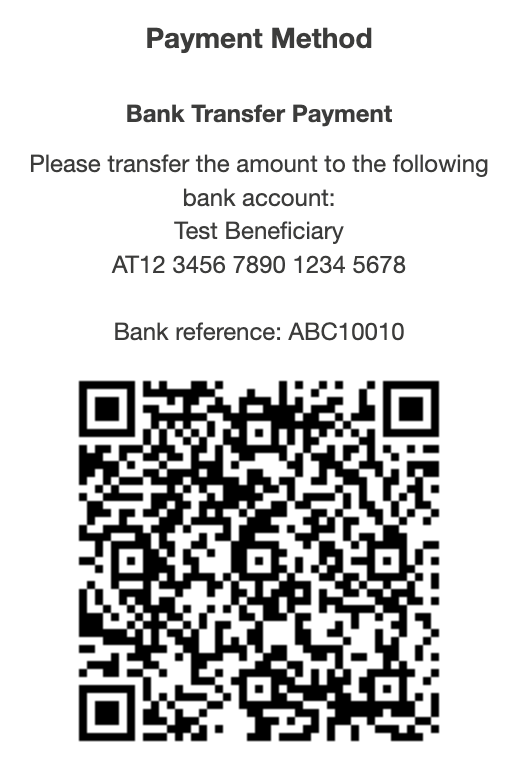
Please observe, that the above shown QR code is an example and does not contain a valid IBAN which results in an error scanning this code with a banking app. With correct configuration, the QR code will work as intended.
Further, the module offers a view model \SchrammelCodes\EpcQrCode\ViewModel\QrCode with following methods that can be
used to render the QR code image tag in the frontend:
renderQrCodeImageTagFromOrderIncrementId(string $orderIncrementId): ?stringrenderQrCodeImageTagFromOrder(\Magento\Sales\Api\Data\OrderInterface $order): ?string
If the prerequisites to render the QR code are not met, the methods will return null.
⬆️ Upgrade
Migration path from 1.x to 2.1 onwards
As 2.0.0 introduced a breaking change by introducing a hash check on public EPC QR code URLs to avoid order probing, 2.1.0 introduces
an upgrade timestamp flag, automatically bypassing the has validation on orders that got placed prior to that date but keeping the check
mandatory on newer orders.
If you've been on version 1.x before already, make sure to directly upgrade to a version >= 2.1.0 to ensure your customers don't see broken QR code images in their older order confirmation emails.
⛙ Contribution
Contributions are welcome! If you have any suggestions, feature requests or issues, please create a new issue or submit a pull request.
⚖️ License
MIT Copyright (c) 2024-2025 Dipl.-Ing. Andreas Schrammel, BSc.
This content is fetched directly from the module's GitHub repository. We are not the authors of this content and take no responsibility for its accuracy, completeness, or any consequences arising from its use.