Build Tests
Code Quality
Release Discipline
Release history audited up to vv1.1.12
Tested on Magento 2.4.9
Recent Test History
Each release is tested against the latest Magento version at that time.
Top Contributors
View Leaderboard

Share This Module's Status
README
Loaded from GitHubMagento 2 Image Resize
Magento 2 Module to add simple image resizing capabilities in all blocks and .phtml templates
Installation
$ composer require "web200/magento-mod-web200_image-resize":"*"
Simple resize image usage
ViewModel
Layout
<?xml version="1.0"?>
<page xmlns:xsi="http://www.w3.org/2001/XMLSchema-instance" xsi:noNamespaceSchemaLocation="urn:magento:framework:View/Layout/etc/page_configuration.xsd">
    <body>
        <referenceContainer name="header.container">
            <block name="authlinks" template="Magento_Theme::authlinks.phtml">
                <arguments>
                    <argument name="image_resize" xsi:type="object">Web200\ImageResize\ViewModel\ImageResize</argument>
                </arguments>
            </block>
        </referenceContainer>
    </body>
</page>
phtml
<?php /** @var \Web200\ImageResize\ViewModel\ImageResize $imageResize */ ?>
<?php $imageResize = $block->getImageResize() ?>
<?php
/**
* $originalImage can be a full url image : https://mywebsite.com/pub/media/catalog/product/a/b/001.jpg
* or relative media path : catalog/product/a/b/001.jpg
*/
?>
<?php $imageResize->getResize()->resizeAndGetUrl($originalImage, $width, $height, $resizeSettings);
Helper
phtml
<?php /** @var \Web200\ImageResize\Helper\ImageResize $resizeHelper */ ?>
<?php $resizeHelper = $this->helper(\Web200\ImageResize\Helper\ImageResize::class) ?>
<?php
/**
* $originalImage can be a full url image : https://mywebsite.com/pub/media/catalog/product/a/b/001.jpg
* or relative media path : catalog/product/a/b/001.jpg
*/
?>
<?php $resizeHelper->getResize()->resizeAndGetUrl($originalImage, $width, $height, $resizeSettings);
Advanced resize and display image usage
- Display alternative image size with breakpoint / retina settings.
- Option to display webp images, available in Store > Configuration > Image Resize.
- In order to display images use a js library : https://github.com/verlok/vanilla-lazyload
ViewModel
Layout
<?xml version="1.0"?>
<page xmlns:xsi="http://www.w3.org/2001/XMLSchema-instance" xsi:noNamespaceSchemaLocation="urn:magento:framework:View/Layout/etc/page_configuration.xsd">
    <body>
        <referenceContainer name="header.container">
            <block name="authlinks" template="Magento_Theme::authlinks.phtml">
                <arguments>
                    <argument name="image_display" xsi:type="object">Web200\ImageResize\ViewModel\ImageDisplay</argument>
                </arguments>
            </block>
        </referenceContainer>
    </body>
</page>
phtml
<?php /** @var \Web200\ImageResize\ViewModel\ImageDisplay $imageDisplay */ ?>
<?php $imageDisplay = $block->getImageDisplay() ?>
<?php
/**
* $originalImage can be a full url image : https://mywebsite.com/pub/media/catalog/product/a/b/001.jpg
* or relative media path : catalog/product/a/b/001.jpg
*/
?>
<?php $imageDisplay->getDisplay()->getImage(
                                      'catalog/product/a/b/001.jpg',
                                      250,
                                      250,
                                      [
                                              'title'       => $block->stripTags('Some Label'),
                                              'retina'      => true,
                                              'breakpoints' => ['1440' => ['325', '325'], '768' => ['250', '250'], '0' => ['150', '150']]
                                          ]
                                  );
Display in html
<picture>
    <source media="(min-width: 768px)" data-srcset="https://domain.com/media/web200_imageresize/cache/cms/images/97x97_co_ar_tr_fr_bc_85/empty.webp 1x, https://domain.com/media/web200_imageresize/cache/cms/images/194x194_co_ar_tr_fr_bc_85/empty.webp 2x" />
    <source media="(min-width: 0px)" data-srcset="https://domain.com/media/web200_imageresize/cache/cms/images/44x44_co_ar_tr_fr_bc_85/empty.webp 1x, https://domain.com/media/web200_imageresize/cache/cms/images/88x88_co_ar_tr_fr_bc_85/empty.webp 2x" />
    <img alt="Service 1" title="Service 1" class="lazy" src="https://domain.com/media/web200_imageresize/cache/catalog/product/placeholder/default/97x97_co_ar_tr_fr_bc_85/placeholder.jpg" data-src="https://domain.com/media/web200_imageresize/cache/cms/images/97x97_co_ar_tr_fr_bc_85/empty.jpg" data-srcset="https://domain.com/media/web200_imageresize/cache/cms/images/97x97_co_ar_tr_fr_bc_85/empty.jpg 1x, https://domain.com/media/web200_imageresize/cache/cms/images/194x194_co_ar_tr_fr_bc_85/empty.webp 2x"/>
</picture>
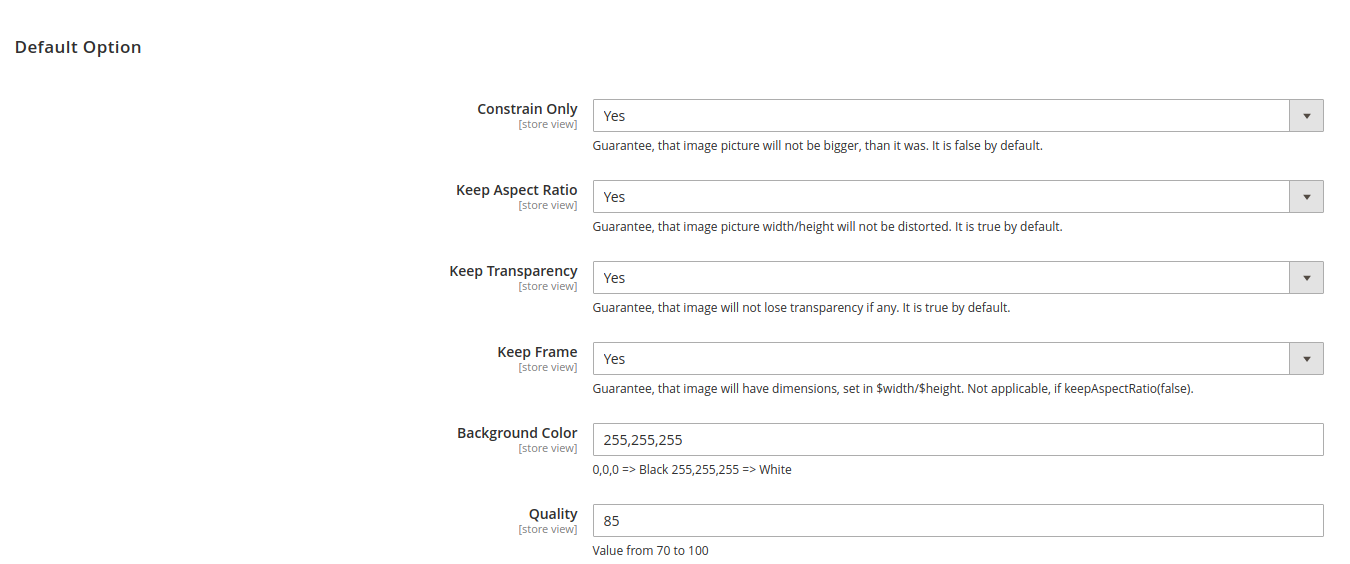
Resize Settings
The folowing is a list of the resize settings that can be set directory to $resizeSettings parameter
| Name | Default | Type |
|---|---|---|
| constrainOnly | true | Boolean |
| keepAspectRatio | true | Boolean |
| keepTransparency | true | Boolean |
| keepFrame | false | Boolean |
| backgroundColor | null | Array with RGB values ([255,255,255]) |
| quality | 85 | Number 1-100 |
| --- | --- | --- |
| watermark | null | array |
| watermark['imagepath'] | null | string |
| watermark['x'] | null | int |
| watermark['y'] | null | int |
| watermark['opacity'] | null | string |
| watermark['title'] | null | string |
or configurate in Store > Configuration > Image Resize
SVG
Authorize and sanitize SVG image upload. Disabled by default. You need to enable it in Store > Configuration > Image Resize.
- Add svg upload for icon and logo website
- Add svg upload for backend configuration files
- Add svg upload for product images
Cache
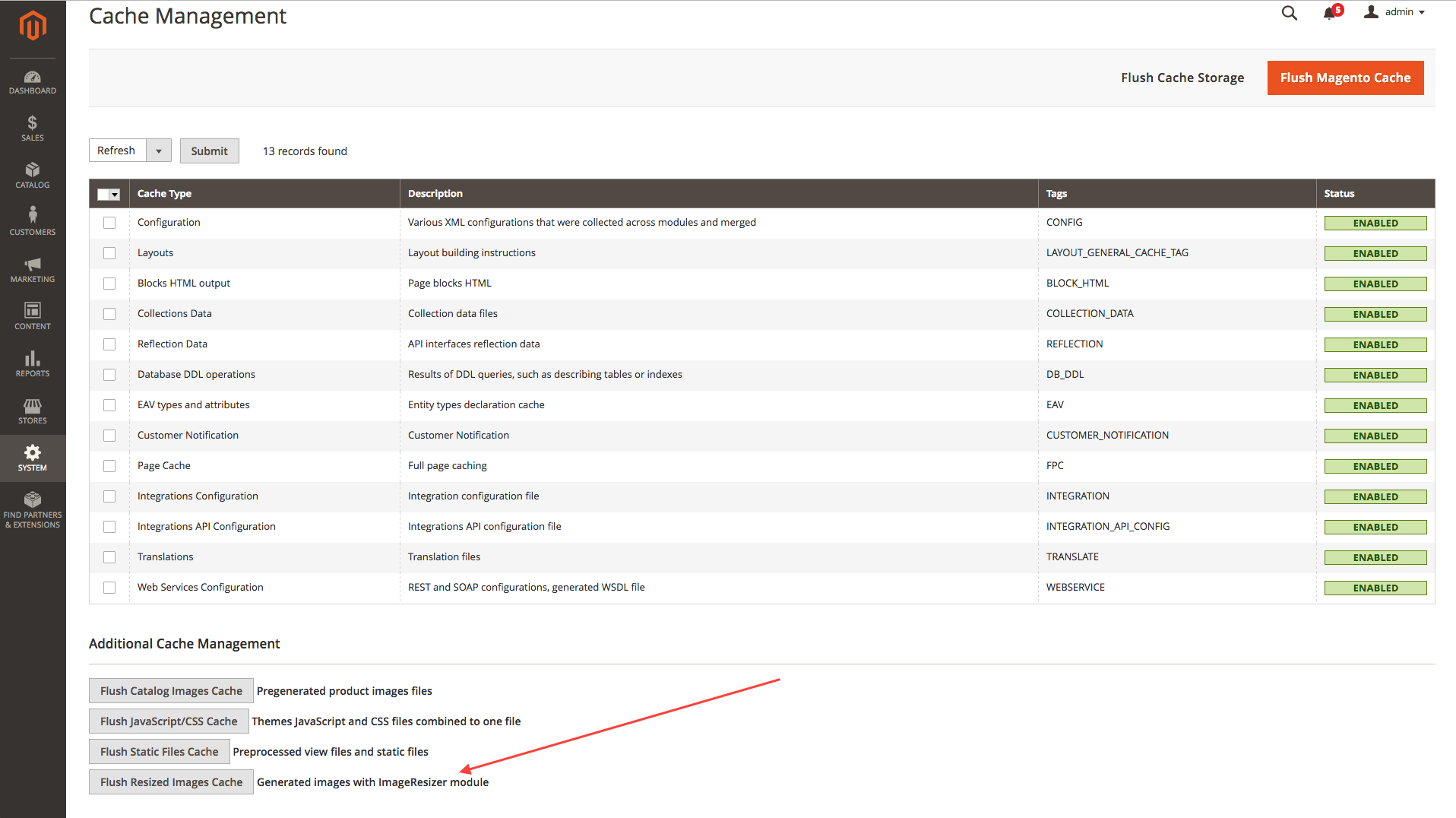
Resized images are saved in cache to improve performance. That way, if an image was already resized, we just use the one in cache.
If you need to, you can clear the resized images cache on the Admin Cache Management
Prerequisites
- PHP >= 7.1.*
- Magento >= 2.3.*
Forked from
This content is fetched directly from the module's GitHub repository. We are not the authors of this content and take no responsibility for its accuracy, completeness, or any consequences arising from its use.