Discorgento Migrations
discorgento/module-migrations 20
A dev-friendly approach to keep track of database changes in Magento 2.
Build Tests
Code Quality
Release Discipline
Release history audited up to v2.10.1
Tested on Magento 2.4.9
Recent Test History
Each release is tested against the latest Magento version at that time.
+8 older tests
Top Contributors
View Leaderboard
Looking for Contributors
Composer installation fails. Your contribution could help the entire Magento community!
Share This Module's Status
README
Loaded from GitHub
[Install] [Usage] [🎭 Facades] [Notes]
Just changed something on the admin panel or on the database and now you need to replicate it again in all project environments, including other dev machines?
Magento supports data patches out of the box, but writing them can get verbose and repetitive quickly. This module greatly simplifies such process.
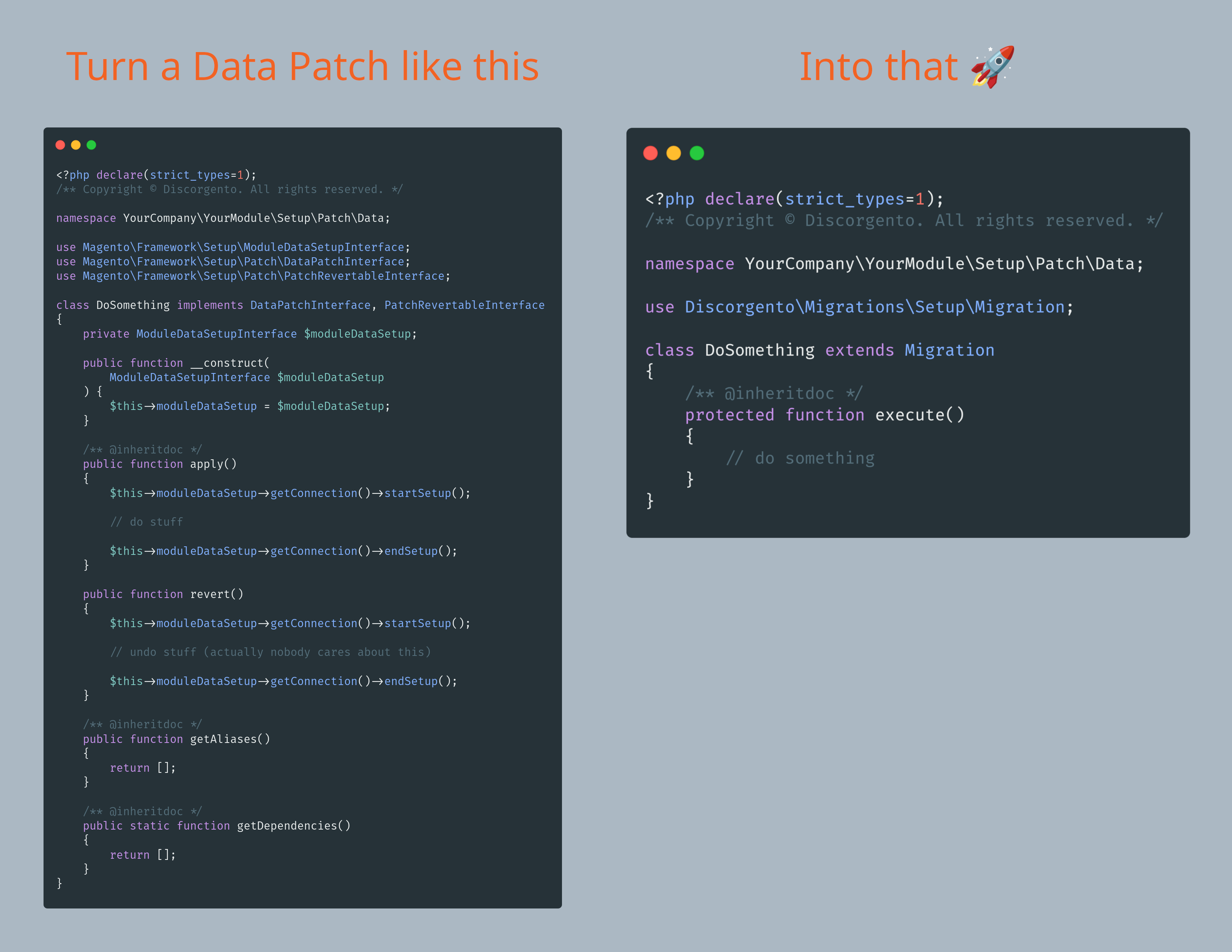 From 50 lines to just 15, or simply 70% less code. SEVENTY percent fewer lines.
But we're just getting started.
From 50 lines to just 15, or simply 70% less code. SEVENTY percent fewer lines.
But we're just getting started.
📥 Install
composer require discorgento/module-migrations
[!NOTE]
This module is compatible with Magento 2.4.6 onward, from PHP 8.1 to 8.4.
🛠️ Usage
Demo
There's also an extended version in Brazilian Portuguese including CMS content management overview available here.
Basic Usage
- in the module you're developing, create a php class under its Setup/Patch/Data/ dir;
- make it extend
Discorgento\Migrations\Setup\Migration; - put your logic inside the
execute(), and runbin/magento setup:upgrade.
Sample data patch:
<?php declare(strict_types=1);

namespace Vendor\Module\Setup\Patch\Data;

use Discorgento\Migrations\Setup\Migration;

class CmsPageMyNewPage extends Migration
{
    public function __construct(
        Migration\Context $context
    ) {
        parent::__construct($context);
    }

    protected function execute()
    {
        // your database changes logic goes here
    }
}
Then run:
bin/magento setup:upgrade
That's it, you successfully ensured that your database changes got tracked in all enviroments.
Facades
Besides simplifying the basic data patch structure, this module also provides helpers for common Magento patch tasks, such as admin config, CMS content, and EAV attributes. Use these when your patch needs to create or update Magento data without writing the same low-level setup code every time.
See FACADES.md for more details, shared helper methods, and the full helper reference.
🗒 Notes
- create an issue in this repo to report a bug;
- Pull Requests are welcome;
- we want YOU for our community!
This content is fetched directly from the module's GitHub repository. We are not the authors of this content and take no responsibility for its accuracy, completeness, or any consequences arising from its use.