AI Reports for Magento 2
gauravharsh/module-ai-reports 13
Adds an LLM-powered reporting assistant that analyzes store data and generates human-readable summaries and recommendations, replacing manual CSV exports and SQL queries with scheduled AI reports.
Build Tests
Code Quality
Release Discipline
Release history audited up to v2.0.2
Tested on Magento 2.4.9
Recent Test History
Each release is tested against the latest Magento version at that time.
Top Contributors
View Leaderboard
Looking for Contributors
Composer installation fails. Your contribution could help the entire Magento community!
Share This Module's Status
README
Loaded from GitHubGaurav AI Reports for Magento 2
A natural-language-to-SQL reporting tool for Adobe Commerce / Magento 2. Type a question in plain English in the admin, an LLM (OpenAI, Anthropic, Google Gemini, or any OpenAI-compatible endpoint) turns it into a SELECT query, and the module runs it against a dedicated read-only database connection and shows you the results.
"Show me the top 5 customers by grand total spent"
Why this module?
Store owners and support staff often need one-off answers from the database — "how many orders over $10k this year", "which customers haven't ordered in 6 months" — without waiting on a developer to write SQL or build a report. This module lets a trusted admin ask in plain English and get a table of results back in seconds, while enforcing that the tool can never write, alter, or delete anything.
Preview
Ask the Database
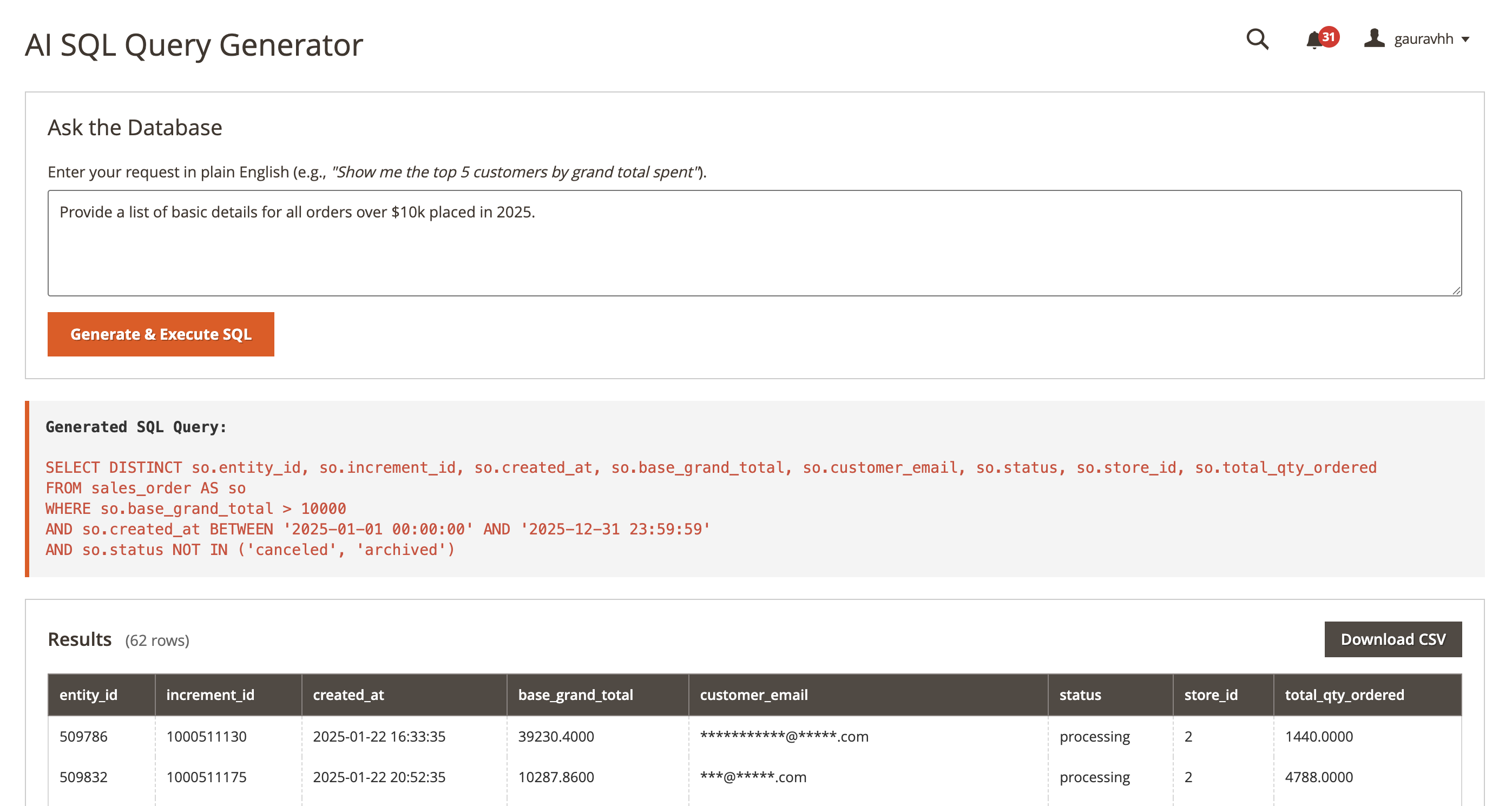 Type a request in plain English; the generated SQL and the results table are both shown, with the SQL panel collapsed by default.
System Configuration
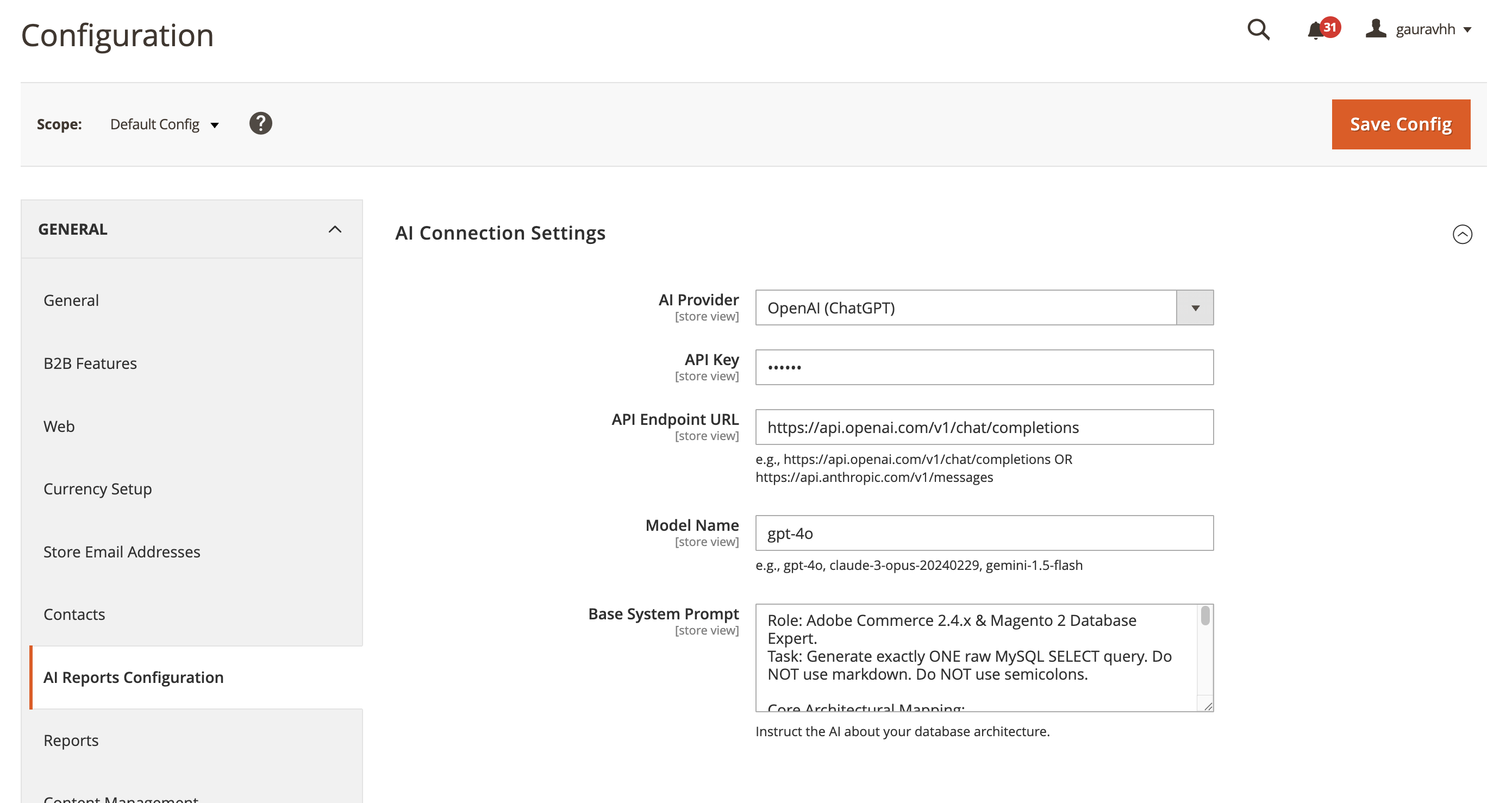 Connect an AI provider, choose a model, and instruct the assistant about your database structure via the system prompt.
How it's secured
This module executes AI-generated SQL against your production database, so read-only access is enforced at multiple independent layers rather than relying on any single check:
- A dedicated, read-only MySQL user, configured only in
app/etc/env.php. The tool refuses to run at all until this is set. It connects to the same host/schema Magento already uses (fromenv.php) — only the username and password differ. Because the credential lives inenv.phprather than admin config, it can't be viewed or changed by anyone through the admin UI — not even someone holding theGaurav_AiReports::configpermission. Changing it requires server file access, the same bar as Magento's own DB credentials. This connection is never the same one Magento's application code uses for everything else. - A forced read-only session. On top of the MySQL user's own
GRANTs, every connection this module opens issuesSET SESSION TRANSACTION READ ONLY, so even a misconfigured grant can't result in a write. - Query validation before execution. Only
SELECT/SHOW/EXPLAIN/DESCRIBEstatements are allowed; SQL comments and multiple statements are rejected outright (rather than silently truncated); a keyword blocklist catches destructive/administrative statements and file-system functions (INTO OUTFILE,LOAD_FILE, etc.). - A non-configurable table denylist. Credential/token tables (
admin_user,oauth_token,api_key,vault_payment_token,core_config_data, and others) can never be queried, no matter what an admin sets in config. Store-specific sensitive tables (e.g.customer_entity) can be added on top of that floor. - Guardrails against abuse. An automatic row
LIMIT(default 1000) is appended to any query that doesn't specify one; a best-effort per-query execution timeout is set; prompts are capped at 2000 characters. - Output is escaped, not trusted. Every value rendered from a query result goes through HTML-escaping before it touches the page (result rows come from the database, not from a fixed template, so this matters). CSV export additionally guards against formula-injection (a cell starting with
=,+,-, or@is neutralized so it can't execute as a formula when opened in Excel/Sheets). - HTTPS-only, timeout-bound AI calls. The configured API endpoint must be HTTPS; requests don't follow redirects and have connect/total timeouts, so a slow or hijacked endpoint can't hang the admin or leak the API key to a redirect target.
- Two independent ACL permissions. Run queries (
Gaurav_AiReports::query) and edit configuration, including credentials (Gaurav_AiReports::config) are separate resources — a role can be granted one without the other. Reviewing the audit trail (Gaurav_AiReports::log, see below) is a third, independent permission. - Full audit trail. Every prompt/query is logged with the admin's username, IP address, the SQL that ran, success/failure, and row count — both to a dedicated log file and to a database table with an admin grid to browse it (see below).
- Config that can't drift per scope. The read-only credentials and all guardrail settings are locked to the global/default scope, so there's no way for a website- or store-view-level override to leave one scope less protected than the others.
Known limitation: every admin with query access queries through the same read-only connection, so all query-tool users currently see the same restricted view of the database (governed by the table denylist). Per-role data restrictions (e.g. a marketing role seeing less than an operations role) aren't implemented.
Navigation
| Location | Purpose |
|---|---|
| Reports > AI SQL Reports | The "Ask the Database" tool itself. |
| Reports > AI Reports Query Log | Audit grid — every prompt/query run through the tool, by whom, when, and with what result. Requires the Gaurav_AiReports::log permission. |
| Stores > Configuration > AI Reports Configuration | AI provider connection and security guardrails. Requires the Gaurav_AiReports::config permission. |
System Configuration
- AI Connection Settings — provider (OpenAI, Anthropic, Google Gemini, or Custom/OpenAI-compatible for Azure OpenAI, Ollama, Groq, OpenRouter, vLLM, etc.), API key, API endpoint URL (must be HTTPS), exact model ID (e.g.
gpt-4o,claude-sonnet-5,gemini-1.5-flash— not a marketing name), and a system prompt describing your database schema to the AI. - Read-Only Database Connection — informational only; shows the exact
env.phpsnippet andGRANTSQL needed. There's nothing to fill in here on purpose (see above). - Security Guardrails — the master enable switch (off by default), max rows per query, query timeout, and any additional blocked tables.
Installation
composer require gauravharsh/module-ai-reports
bin/magento module:enable Gaurav_AiReports
bin/magento setup:upgrade
bin/magento setup:db-declaration:generate-whitelist --module-name=Gaurav_AiReports
bin/magento setup:di:compile
bin/magento cache:flush
The generate-whitelist step is required because this module ships a database table for the audit log (gaurav_aireports_query_log) via declarative schema.
Setup after installing
- Create the read-only MySQL user (adjust the database name to match your
env.php):
Restrict the host part (CREATE USER 'aireports_ro'@'%' IDENTIFIED BY 'a-strong-random-password'; GRANT SELECT ON your_database_name.* TO 'aireports_ro'@'%'; FLUSH PRIVILEGES;'%') to your application server where possible, and consider revokingSELECTon individual sensitive tables for extra defense in depth on top of the module's own denylist. - Add the credentials to
app/etc/env.php(never to admin config, and never commit this file):
Deploy/restart so the new'aireports' => [ 'readonly_connection' => [ 'username' => 'aireports_ro', 'password' => 'a-strong-random-password', ], ],env.phpis picked up. - Go to Stores > Configuration > AI Reports Configuration and fill in your AI provider details, then review the guardrails.
- Flip Enable Query Tool to Yes.
- Assign
Gaurav_AiReports::query,Gaurav_AiReports::log, andGaurav_AiReports::configto admin roles individually, based on who should be able to run queries, review the audit trail, and manage AI provider settings, respectively.env.phpaccess (and therefore the DB credential) is controlled entirely outside Magento's ACL, at the server/deploy level.
License
OSL-3.0 / AFL-3.0
This content is fetched directly from the module's GitHub repository. We are not the authors of this content and take no responsibility for its accuracy, completeness, or any consequences arising from its use.