Log Monitor for Magento 2
gauravharsh/module-log-monitor 13
Transforms var/log files into an actionable health dashboard, surfacing recurring errors and silent failures such as failed ERP/CRM syncs while scanning multi-gigabyte logs with minimal memory use.
Build Tests
Code Quality
Release Discipline
Release history audited up to v1.1.0
Tested on Magento 2.4.9
Recent Test History
Each release is tested against the latest Magento version at that time.
Top Contributors
View Leaderboard
Looking for Contributors
Composer installation fails. Your contribution could help the entire Magento community!
Share This Module's Status
README
Loaded from GitHubGaurav Log Monitor for Magento 2
A professional-grade, high-performance monitoring engine that transforms chaotic var/log files into a clean, actionable, deduplicated error dashboard for Adobe Commerce.
📖 Why This Module?
In most Magento environments, log files are a "dark hole." They grow to gigabytes, are rarely checked until a site crashes, and contain thousands of repetitive lines that bury the actual root cause of issues.
Gaurav_LogMonitor was built to solve this by providing:
- Proactive Health Checks: Identifies "Silent Killers" like failed background data syncs (ERP/CRM) that don't crash the frontend.
- Operational Efficiency: Stops senior developers from wasting hours "log hunting" through massive text files.
- Server Stability: Scans 10GB+ logs using near-zero RAM, ensuring the monitoring tool never becomes a bottleneck.
- Rotation-Aware: Understands daily-rotated, gzipped log files, so errors written right before rotation aren't silently lost.
🖥️ Preview & UI
1. Unified Error Dashboard
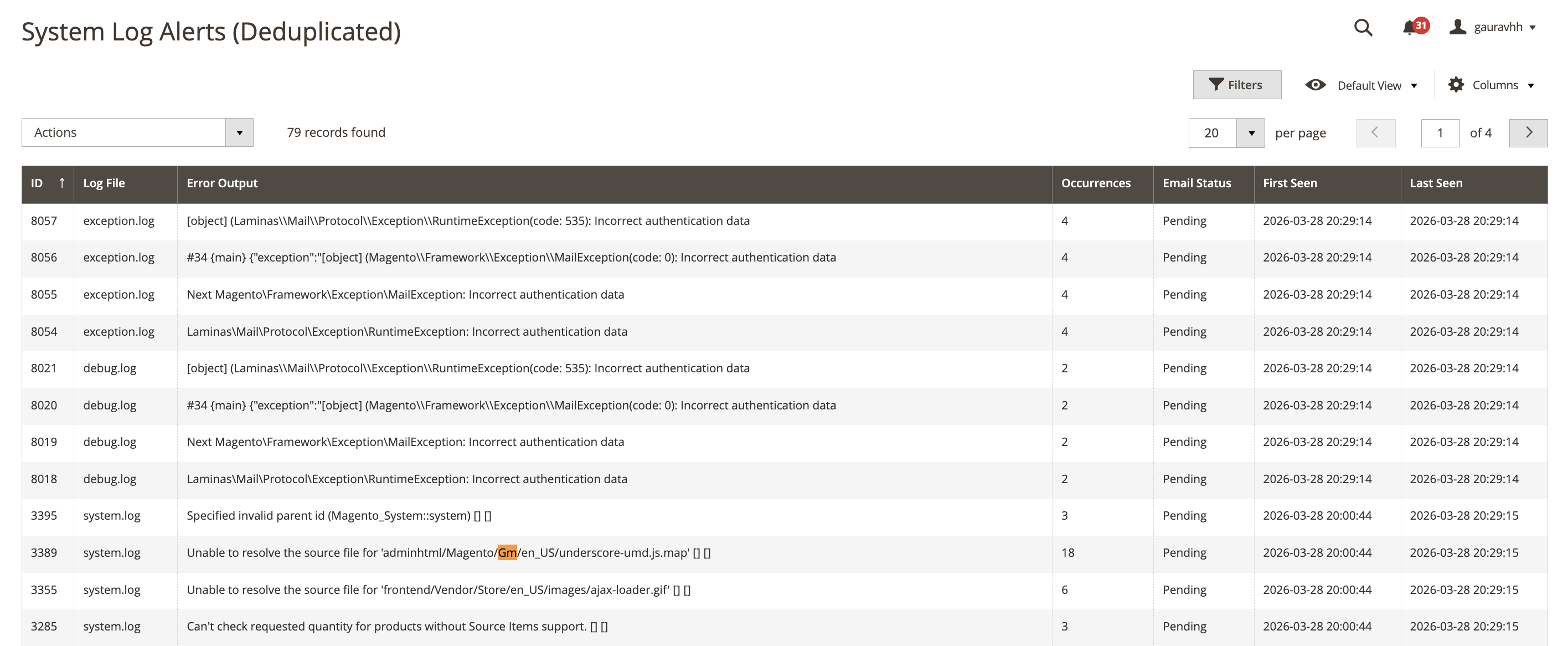 A consolidated, searchable view of all unique errors across every .log file in your system. This grid groups thousands of identical errors into single, manageable records.
2. Smart Alert Configuration
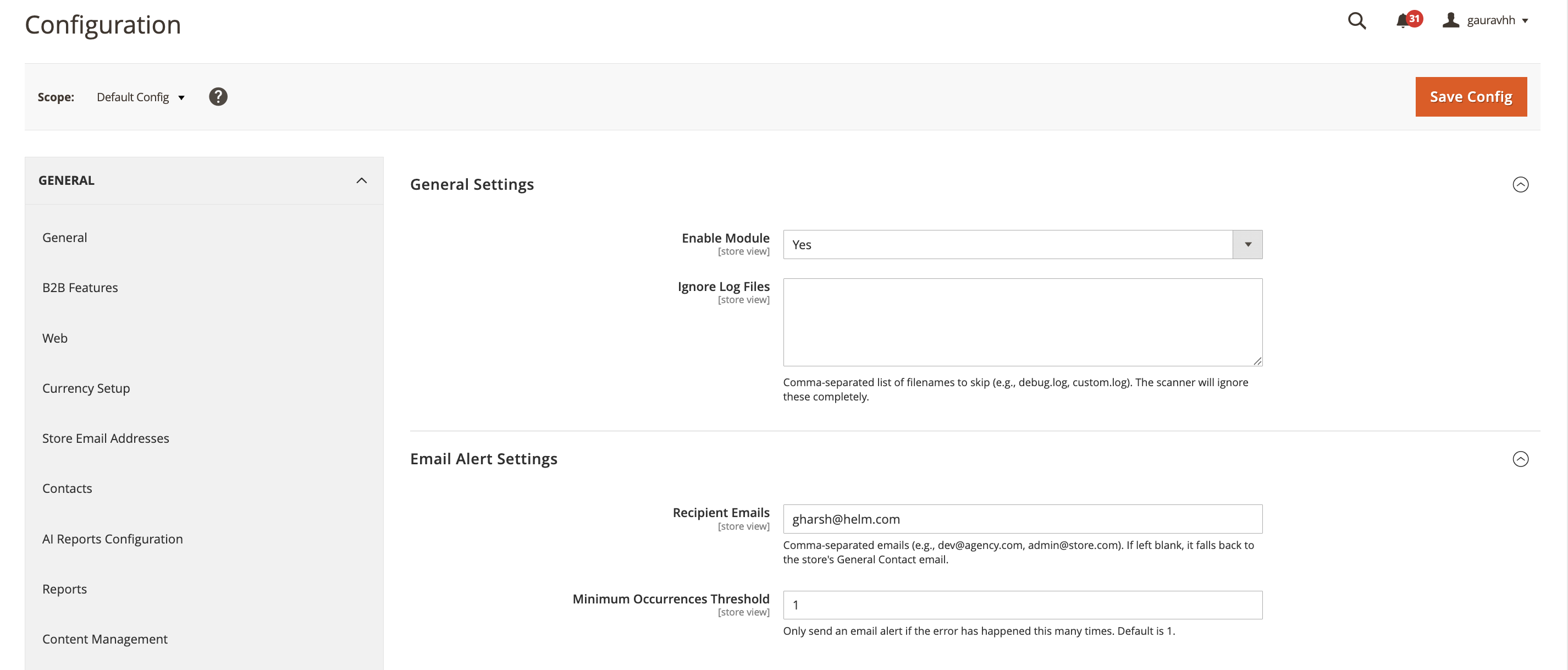 Easily manage your monitoring settings, define custom email recipients, and set alert thresholds.
✅ Feature Overview
| Feature | Description |
|---|---|
| Byte-offset scanning | Only reads newly-appended bytes on every run, not the whole file — near-zero RAM even on multi-GB logs. |
| Multi-line trace grouping | Groups a stack trace's continuation lines with the timestamped line that started it into a single error record. |
| Content-hash deduplication | Identical errors (same file + normalized message) collapse into one row with an incrementing occurrence_count, instead of flooding the grid. |
| Rotated/gzipped archive scanning (opt-in) | Reads exception.log.1, exception.log.1.gz, etc. exactly once (they're immutable once rotated) and merges the results into the same alert history as the live file, closing the gap around rotation time. |
| Severity classification | Parses channel.LEVEL: from each line; unrecognized formats are tagged UNKNOWN and kept visible instead of being silently dropped. INFO/DEBUG are filtered out to keep the dashboard focused on actionable errors. |
| Threshold + recurrence-aware alerting | Emails fire once an error crosses the configured occurrence threshold, and will fire again if it keeps recurring after the first email — it doesn't go silent forever after one notification. |
| Cron overlap protection | A non-blocking lock ensures two scans can't run at once and corrupt the byte-offset state if a run takes longer than the 5-minute schedule. |
| Per-file fault isolation | A corrupt or unreadable log file is skipped and logged — it doesn't abort the scan for every other file that run. |
| Automatic retention cleanup | A daily job purges alerts that haven't been seen within a configurable retention window, so the table doesn't grow forever. |
| Deduplicated admin grid | Filter/sort by severity, log file, occurrence count, email status, first/last seen; drill into the full stack trace per alert. |
| Scoped ACL | Dashboard and Settings are gated behind their own admin permissions, not the generic backend/admin resource. |
⚙️ Configuration & Navigation
After installation, you can manage the module and view alerts via the following paths:
Admin Dashboard (The Grid)
Navigate to: System > Log Monitor Alerts This is the central command center where you view, filter, and mass-delete deduplicated error logs.
System Configuration
Navigate to: Stores > Configuration > Gaurav Extensions > Log Monitor
General Settings
- Enable Module: Master switch for the background scanner and alert emails.
- Ignore Log Files: Comma-separated filenames to skip entirely (e.g.
debug.log, custom.log). - Scan Rotated/Gzipped Archives: Off by default. Turn on if your server rotates + gzips logs (e.g. daily via
logrotate) and you want those archives scanned once so nothing written right before rotation is missed. - Alert Retention (Days): How long an alert is kept after it was last seen before the daily cleanup job deletes it.
0disables cleanup entirely.
Email Alert Settings
- Recipient Emails: Comma-separated list of developers to receive alert emails. Falls back to the store's General Contact email if left blank.
- Minimum Occurrences Threshold: How many times an error must occur (since it was last emailed, or since it was first seen) before an alert email is sent.
🏗️ Business Flow
1. Scanning — logmonitor_process cron (every 5 minutes) / bin/magento logmonitor:process
- Skip entirely if the module is disabled.
- Acquire a non-blocking lock; if a previous scan is still running (e.g. a very large log took longer than 5 minutes), skip this run rather than racing it.
- List
var/log. For each*.logfile not on the ignore list:- Load its last-read byte offset from the state table.
- If the file shrank since last time (rotation happened) or a full reset was requested, restart from byte 0.
- Skip if there's no new data.
- Seek straight to the last offset and stream new lines with
fgets()— no full-file load. - A line starting with a Magento timestamp (
[YYYY-MM-DD HH:MM:SS]) begins a new error block; every following non-timestamped line (stack trace) is appended to it, capped at 500 lines / 64KB so a malformed file can't balloon memory. - Extract severity from
channel.LEVEL:; unmatched formats becomeUNKNOWNrather than being dropped asINFO. - Normalize the line (timestamp stripped) and MD5-hash it — this hash plus the log file name is the dedup key.
- Save the byte offset actually reached back to the state table.
- A failure on one file is logged and the loop continues with the next file.
- If archive scanning is enabled, also walk any
*.log.N/*.log.N.gzfiles. Each archive is checked against a separate "already processed" table (keyed by name + size, since archives never change once written) and, if new, read fully exactly one time — then tagged as processed so it's never re-read. - Release the lock.
2. Deduplication — inside every save
- INFO/DEBUG severities are discarded immediately; everything else is kept.
- The alert is looked up by the exact
(log_file, error_hash)pair. - Exists:
occurrence_count+1,last_seen_atrefreshed. The stored trace isn't rewritten (same hash implies effectively the same trace). - New: a row is created with severity, a 250-character preview, the full trace (capped at 20,000 characters),
occurrence_count = 1, andis_notified = 0.
3. Alerting — logmonitor_send_alerts cron (hourly)
- Skip if disabled.
- Select every alert where
occurrence_count - last_notified_count >= threshold— this covers brand-new alerts that just crossed the threshold and previously-notified alerts that have recurred bythresholdmore occurrences since their last email. - Compute the combined size and most recent modified time across all
.logfiles for the email header. - Render
log_alert.htmlwith the alert previews (not full traces, to keep emails small) and send to the configured recipients. - On success, mark
is_notified = 1and snapshotlast_notified_count = occurrence_countfor every alert included — so the next alert only fires after further recurrence, not on every single scan. - Send failures fail silently and are simply retried next hour, since the notified markers were never updated.
4. Cleanup — logmonitor_cleanup cron (daily, 2:30am)
- If retention is enabled (> 0 days), deletes any alert whose
last_seen_atis older than the configured window.
5. Investigation — Admin Dashboard
- System > Log Monitor Alerts lists every deduplicated alert: severity, log file, preview, occurrence count, email status (Pending/Emailed), first seen, last seen — all filterable and sortable.
- View opens the full stack trace for a single alert.
- Mass Delete clears out selected alerts (there is currently no separate "resolve/mute" state — deleting is how an alert is cleared from the grid; if the same error recurs afterward it will simply be recreated as new).
📋 Requirements
- PHP: 8.1, 8.2, 8.3, or 8.4. The module has no version-specific syntax (no
match/enum/readonly/arrow-fn-only constructs, no removed-in-8.0 functions), so it isn't tied to a narrow PHP release. - Magento: 2.3.6+ (the cron scanner uses
Magento\Framework\Lock\LockManagerInterface, introduced in 2.3.6, to prevent overlapping scans on large log files). In practice, run it on whatever Magento 2.4.x version your PHP install already requires — the PHP range above tracks Magento's own currently-supported versions rather than a narrower artificial floor.
🛠️ Installation & Setup
composer require gauravharsh/module-log-monitor
bin/magento module:enable Gaurav_LogMonitor
bin/magento setup:upgrade
bin/magento setup:di:compile
bin/magento cache:flush
This content is fetched directly from the module's GitHub repository. We are not the authors of this content and take no responsibility for its accuracy, completeness, or any consequences arising from its use.