Build Tests
Code Quality
Release Discipline
Release history audited up to vv1.1.2
Tested on Magento 2.4.9
Recent Test History
Each release is tested against the latest Magento version at that time.
Top Contributors
View Leaderboard


Share This Module's Status
README
Loaded from GitHubChange Customer Password In Admin - Magento 2
composer require ghoster/changecustomerpassword
Change Customer Password In Admin Magento 2 module is implements the form in customer edit which allow admin change customer password directly like old-fashion way Magento 1.
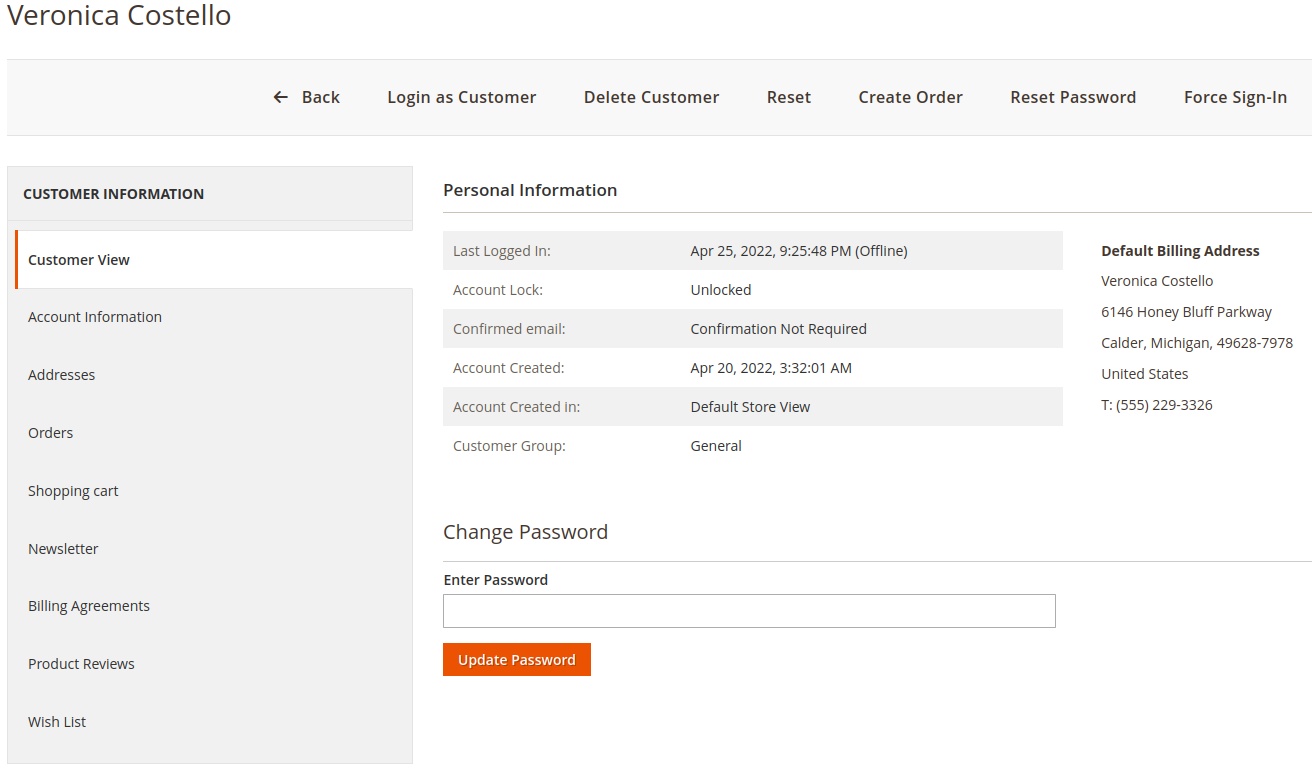
Main Features
- Add a quick update Password button to customer view in Admin
Command-line usage
Call the console command and pass the customers email address and the new password.
bin/magento customer:change-password test@example.com password123
If customer accounts are not shared between websites, a website code has to be specified with the --website or -w
option.
bin/magento customer:change-password --website base test@example.com password123
Installation with Composer
- Connect to your server with SSH
- Navigation to your project and run these commands
composer require ghoster/changecustomerpassword


php bin/magento setup:upgrade
rm -rf pub/static/*
rm -rf var/*

php bin/magento setup:static-content:deploy
Installation without Composer
- Download the files from github: Direct download link
- Extract archive and copy all directories to app/code/GhoSter/ChangeCustomerPassword
- Go to project home directory and execute these commands
php bin/magento setup:upgrade
rm -rf pub/static/*
rm -rf var/*

php bin/magento setup:static-content:deploy
Licence
Open Software License (OSL 3.0)
Donation
If this project help you reduce time to develop, you can give me a cup of coffee :)
This content is fetched directly from the module's GitHub repository. We are not the authors of this content and take no responsibility for its accuracy, completeness, or any consequences arising from its use.