Build Tests
Code Quality
Release Discipline
Release history audited up to v1.0.2
Tested on Magento 2.4.9
Recent Test History
Each release is tested against the latest Magento version at that time.
Top Contributors
View Leaderboard

Share This Module's Status
README
Loaded from GitHubGtstudio_AiDashboard
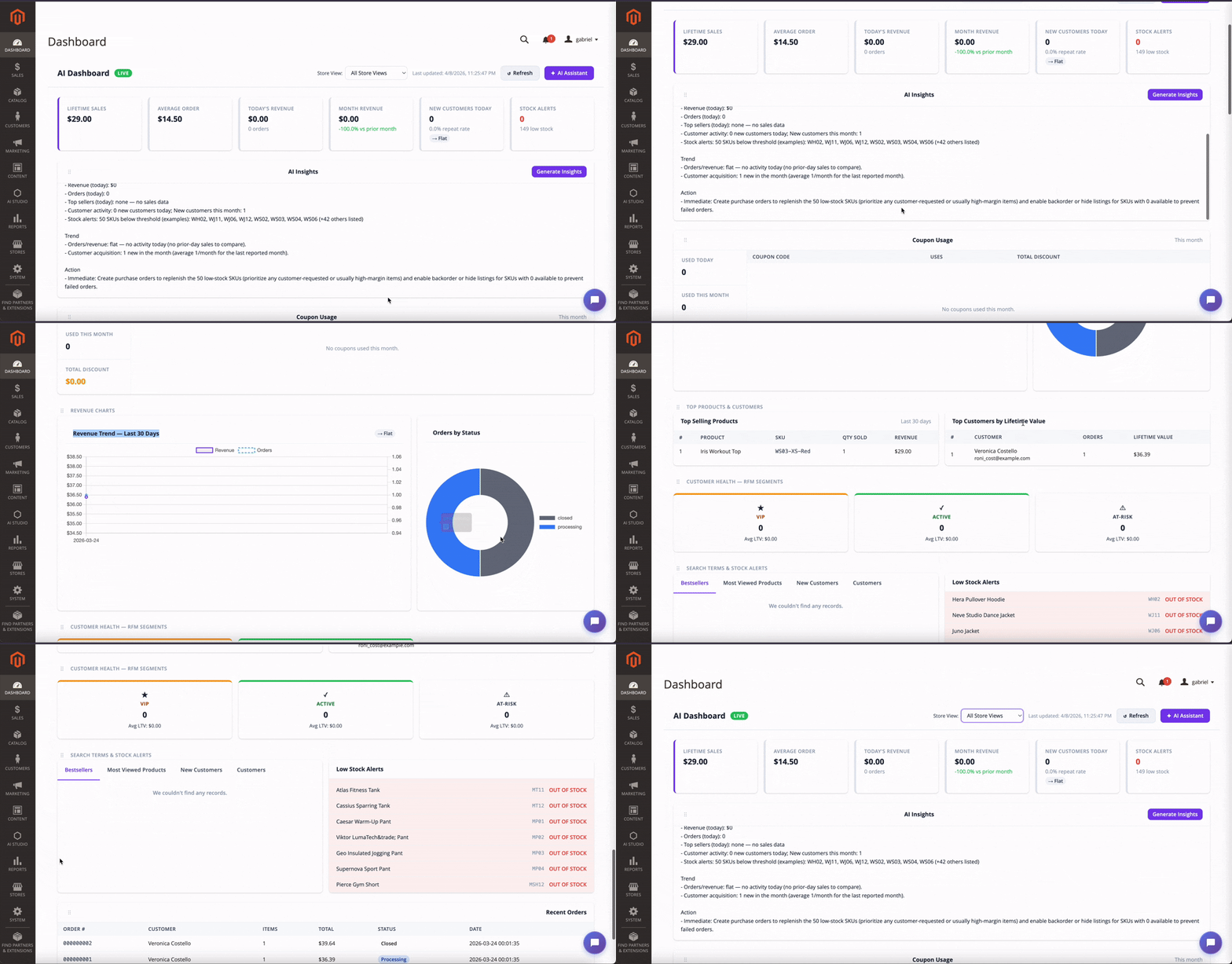
AI-powered analytics dashboard for Magento 2. Replaces the stock admin dashboard with KPI cards, charts, and an embedded store assistant — all built from data computed on cron and served from cache.
Preview
AI Studio Ecosystem
Part of the AI Studio suite for Magento 2. See all modules:
| Module | Repository | Description |
|---|---|---|
| Gtstudio_AiConnector | module-aiconnector | Core AI provider abstraction |
| Gtstudio_AiAgents | module-ai-agents | Agent & tool orchestration, cron scheduling, execution log |
| Gtstudio_AiWidgets | module-ai-widgets | Floating admin chat widget + PageBuilder AI generator |
| Gtstudio_AiDataQuery | module-ai-data-query | Natural-language store analytics (privacy-first) |
| Gtstudio_AiKnowledgeBase | module-ai-knowledge-base | Document upload & RAG retrieval for agents |
| Gtstudio_AiDashboard | (this module) | AI-powered KPI dashboard with ML insights |
What It Does
- Replaces the default Magento admin dashboard with a richer analytics view
- Metrics are collected on a background cron job and served from a dedicated cache type — no real-time DB load on page load
- KPI cards: today/week/month revenue, orders, new customers, average order value, pending orders
- Charts: 30-day revenue trend (line), orders by status (donut)
- Tables: top 10 products by quantity sold, top 5 customers by LTV, last 10 orders
- Alerts: low-stock product list (threshold configurable)
- AI Insights: one-click AI summary of store performance via the
store_assistantagent - Chat drawer: conversational interface backed by the same agent and the Data Query tool set
- ML features (via
php-ml): k-Means customer segmentation (VIP / Active / At-Risk), OLS trend arrows on KPI cards, ±2σ stock depletion anomaly detection
Requirements
- Magento 2.4.4+
- PHP 8.1+
Gtstudio_AiConnectorenabled and configuredGtstudio_AiAgentsenabledGtstudio_AiDataQueryenabledphp-ml/php-ml(ML features — pulled automatically by Composer)
Installation
composer require gtstudio/module-ai-dashboard
php bin/magento module:enable Gtstudio_AiDashboard
php bin/magento setup:upgrade
A store_assistant agent record is created automatically via a data patch on setup:upgrade.
Configuration
Stores → Configuration → AI Studio → AI Dashboard
| Field | Description |
|---|---|
| Full Rebuild Schedule | Cron expression for the complete metrics rebuild (default: 5 0 * * *) |
| Today Refresh Schedule | Cron expression for the incremental today-only refresh (default: 0 * * * *) |
| Low Stock Threshold | Products with quantity below this value appear in the alerts list (default: 10) |
| Trend Window (days) | Number of days used for revenue and customer trend charts (default: 30) |
How It Works
Data Collection
Heavy queries run in the background on two cron jobs:
| Job | Default Schedule | Purpose |
|---|---|---|
BuildDashboardData |
5 0 * * * |
Full rebuild — all collectors, all time ranges |
RefreshTodayData |
0 * * * * |
Incremental — today's metrics only |
Results are written to a dedicated cache type (dashboard_cache_tag) and served as JSON to the frontend.
Cache Keys
| Key | TTL | Rebuilt by |
|---|---|---|
dashboard_snapshot_v1 |
3600 s | BuildDashboardData |
dashboard_today_v1 |
1800 s | RefreshTodayData |
dashboard_ai_insights_v1 |
7200 s | On-demand via Get AI Insights button |
To force a rebuild manually:
php bin/magento cache:clean dashboard_cache_tag
php bin/magento cron:run --group=gtstudio_aidashboard
AI Insights & Chat
The Get AI Insights button calls the store_assistant agent with a summary of current metrics and returns a markdown analysis. The chat drawer allows follow-up questions; it has access to all Data Query tools (order_analytics, customer_lifetime_value, product_performance, query_entity).
Extensibility
Adding a custom metric collector
Implement a collector and inject it into DashboardDataService via di.xml:
<type name="Gtstudio\AiDashboard\Model\DashboardDataService">
    <arguments>
        <argument name="collectors" xsi:type="array">
            <item name="my_metric" xsi:type="object">
                Vendor\Module\Model\Collector\MyMetricCollector
            </item>
        </argument>
    </arguments>
</type>
Replacing an ML analyzer
Override via DI preference — for example, to replace the customer segmentation algorithm:
<preference for="Gtstudio\AiDashboard\Model\Analytics\CustomerSegmentationAnalyzer"
            type="Vendor\Module\Model\Analytics\MySegmentationAnalyzer"/>
Swapping the insights agent
Override the block method that resolves the agent code:
<preference for="Gtstudio\AiDashboard\Block\Adminhtml\Dashboard"
            type="Vendor\Module\Block\Adminhtml\Dashboard"/>
Then override getAgentCode() in your subclass to return a different agent code.
ACL Resources
| Resource | Controls |
|---|---|
Gtstudio_AiDashboard::management |
Access to the AI Dashboard page and its AJAX endpoints |
This content is fetched directly from the module's GitHub repository. We are not the authors of this content and take no responsibility for its accuracy, completeness, or any consequences arising from its use.