Email Template Editor for Magento 2
hryvinskyi/magento2-email-template-editor 71
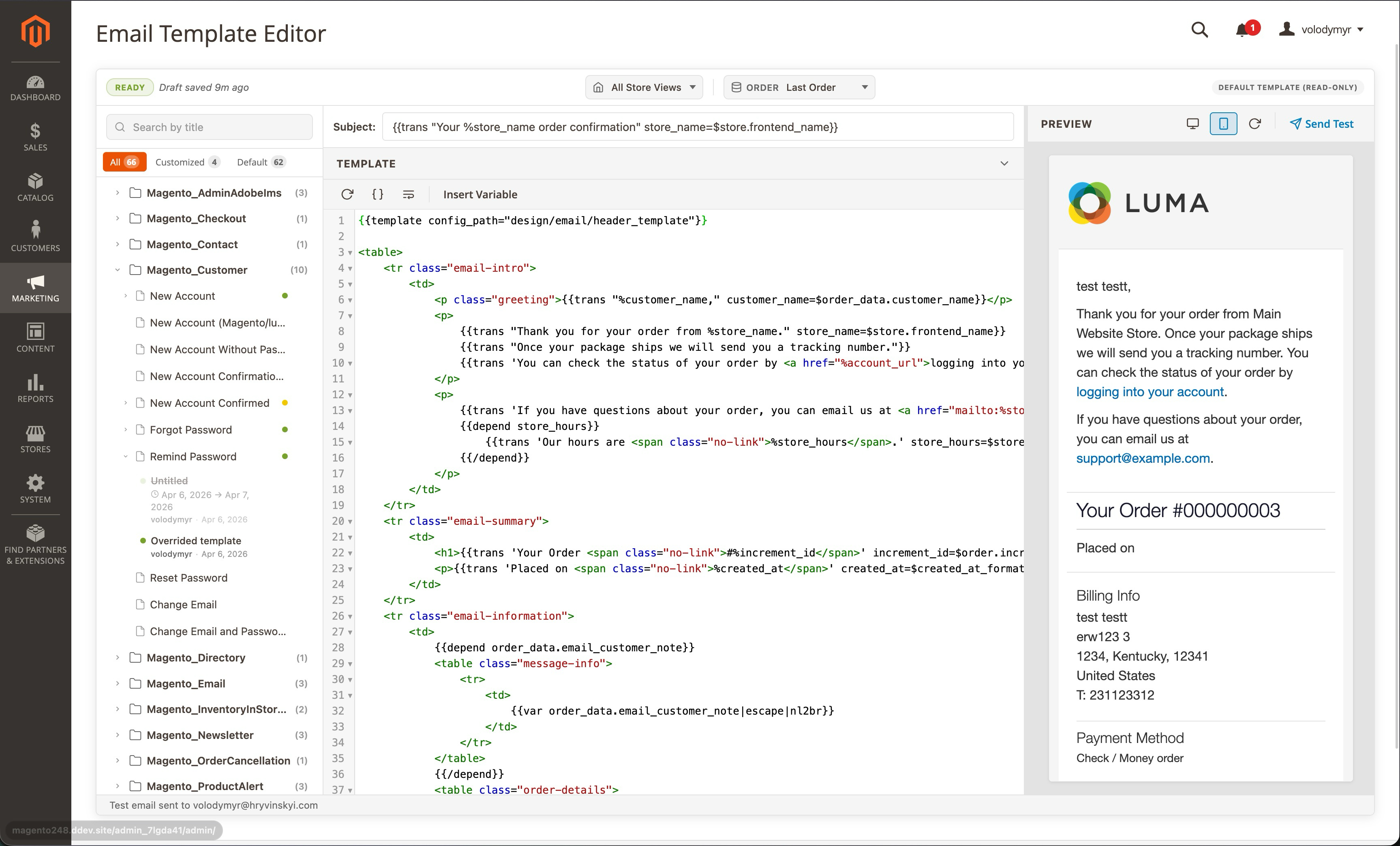
Replaces Magento's default email template management with a CodeMirror-powered visual editor offering live split-pane preview, draft and version management with diffs, scheduled publishing, and template filtering by module group.
Build Tests
Code Quality
Release Discipline
Release history audited up to v1.3.0
Tested on Magento 2.4.9
Recent Test History
Each release is tested against the latest Magento version at that time.
+2 older tests
Top Contributors
View Leaderboard
Share This Module's Status
README
Loaded from GitHubHryvinskyi Email Template Editor for Magento 2
A professional, feature-rich email template editor for Magento 2 that replaces the default email template management with a modern, real-time editing experience.
Features
- Visual Template Editor — CodeMirror-powered code editor with syntax highlighting, code folding, and bracket matching
- Live Preview — Real-time split-pane preview with desktop/mobile viewport toggle
- Template Sidebar with Filters — Browse templates by module group, filter by All / Customized / Default
- Draft Management — Create, rename, duplicate, delete drafts with auto-save
- Publish with Schedule — Publish immediately or schedule for a date range, with changes summary
- Schedule Timeline — Visual progress bar with start/end dates, duration, and status (Active / Scheduled / Expired)
- Version History — Full history with diff viewer, preview, and one-click restore
- Variable Chooser — Searchable slide-in panel with grouped variables and recently used tracking
- Theme System — JSON-based themes with import/export
- Custom CSS & Tailwind — Write custom CSS or use Tailwind utilities, auto-inlined for email clients
- Send Test Email — Send preview to any email address for real client testing
- Keyboard Shortcuts —
Ctrl+Ssave,Ctrl+Shift+Ppublish,Ctrl+Enterrefresh,Ctrl+Shift+Hhistory,Ctrl+Shift+Etest email,Escapeclose - Confirmation Dialogs — Styled modals for all destructive actions to prevent accidental data loss
- Sample Data Providers — Mock data, last order/customer, specific order search, or custom JSON variables
- Store View Overrides — Different templates per store view
- Admin User Tracking — Created by, last edited by, timestamps on all overrides
Requirements
- Magento 2.4.6+
- PHP 8.1+
hryvinskyi/magento2-basehryvinskyi/magento2-configuration-fields
Installation
Composer
composer require hryvinskyi/magento2-email-template-editor
bin/magento setup:upgrade
bin/magento setup:di:compile
bin/magento cache:flush
Manual
- Copy the module to
app/code/Hryvinskyi/EmailTemplateEditor/ - Run:
bin/magento setup:upgrade
bin/magento setup:di:compile
bin/magento cache:flush
Configuration
Navigate to Stores > Configuration > Hryvinskyi > Email Template Editor > General Settings to enable/disable the editor.
Usage
Accessing the Editor
Navigate to Stores > Email Template Editor in the Magento admin panel.
Editing a Template
- Select a template from the left sidebar
- Edit the HTML content in the code editor
- Preview changes in real time on the right panel
- Use the variable chooser to insert template variables
- Add custom CSS or apply a theme
- Save as draft or publish when ready
Managing Overrides
Each template can have multiple overrides:
- Drafts - Work-in-progress versions (auto-saved)
- Published - Live overrides applied to transactional emails
- Scheduled - Overrides with active date ranges
Publishing Workflow
- Edit the template content
- Click Publish (or
Ctrl+Shift+P) - Review the changes summary
- Add a version comment
- Choose immediate or scheduled publishing
- Confirm to publish
License
MIT - Copyright (c) 2026 Volodymyr Hryvinskyi. All rights reserved.
This content is fetched directly from the module's GitHub repository. We are not the authors of this content and take no responsibility for its accuracy, completeness, or any consequences arising from its use.