Stable
v1.0.0
OSL-3.0, AFL-3.0
129
Downloads
Below average
0
GitHub Stars
5mo ago
Last Release
0
Open Issues
Build Passing
Ready to install
Build Tests
Composer Install
DI Compile
Templates
Code Quality
Release Discipline
Release history audited up to v1.0.0
Tested on Magento 2.4.9
Recent Test History
Each release is tested against the latest Magento version at that time.
v1.0.0
on Magento 2.4.9
GitHub Repository
Source code & docs
Packagist
Version history
Issues & Support
Get help or report bugs
Top Contributors
View Leaderboard
Share This Module's Status
README
Loaded from GitHubLohoy ReCaptchaEnterprise
This module extends the Magento native ReCaptcha UI functionality to integrate Google ReCaptcha Enterprise instead of the default implementation. It leverages the official Google Cloud PHP Client for reCAPTCHA Enterprise under the hood.
Requirements
- PHP >= 8.1
- Magento ReCaptchaEnterprise module
Installation
-
Add the module to your project via Composer:
composer require lohoy/magento-recaptcha-enterprise -
Enable the module:
bin/magento module:enable Lohoy_ReCaptchaEnterprise
bin/magento setup:upgrade
Configuration
To configure the module from the Magento Admin:
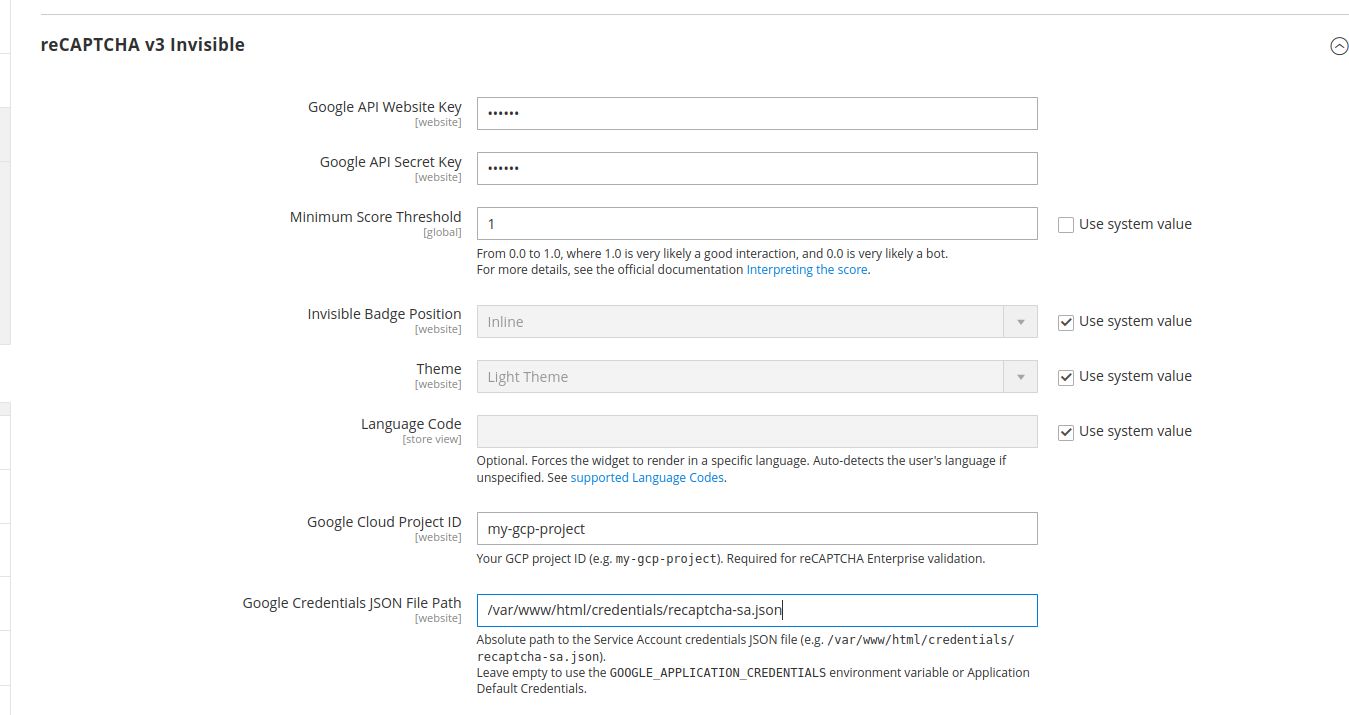
- Navigate to Stores > Configuration > Security > Google reCAPTCHA Storefront.
- Expand the reCAPTCHA v3 Invisible section.
- Provide the credentials specific to your Google Cloud Enterprise project:
- Google Cloud Project ID: Your Google Cloud project ID.
- Google Credentials JSON File Path: Absolute path to the Service Account credentials JSON file (e.g.,
/var/www/html/magento/credentials.json). Leave empty to use theGOOGLE_APPLICATION_CREDENTIALSenvironment variable or Application Default Credentials.
This content is fetched directly from the module's GitHub repository. We are not the authors of this content and take no responsibility for its accuracy, completeness, or any consequences arising from its use.