Panth Image SEO
mage2kishan/module-image-seo 22
Auto-generates SEO-friendly alt and title attributes for product images from configurable templates with tokens ({{name}}, {{sku}}, {{store}}, {{category}}) and chainable filters. Applies everywhere images render — grids, galleries, related/upsell/cross-sell, widgets, search — scope-aware and compatible with Hyva and Luma.
Build Tests
Code Quality
Release Discipline
Release history audited up to v1.0.14
Tested on Magento 2.4.9
Recent Test History
Each release is tested against the latest Magento version at that time.
+5 older tests
Top Contributors
View Leaderboard
Looking for Contributors
Composer installation fails. Your contribution could help the entire Magento community!
Share This Module's Status
README
Loaded from GitHubMagento 2 Image SEO
Generates the alt and title attributes of product images from templates such as {{name}} - {{store}}, so every product image on the storefront carries descriptive text without editing each image label by hand. It also cleans the filenames of images uploaded through Magento's catalog image uploader.
The module is for store owners who want consistent image alt text for search engines and accessibility across category listings, product pages, widgets and the product gallery. Works with the Hyva and Luma themes.
Product page: kishansavaliya.com/magento-2-image-seo.html
Features
- Alt and title templates with the tokens
{{name}},{{sku}},{{store}}and{{category}}. - Filters that can be chained on any token:
truncate:N,title,upper,lower,stripanddefault:'text'. - Applies to product images rendered through Magento's image blocks and image helper (category listings, search results, related and upsell lists, widgets, product page) and to the product gallery JSON used by the gallery widget.
- In the gallery, captions that were typed by a merchant are kept; empty captions, captions equal to the product name and Magento's placeholder labels are replaced, with "Image N of M" appended when a product has several images.
- Renames images uploaded through Magento's catalog image uploader to a lowercase ASCII filename (transliterated, hyphen separated, at most 120 characters).
- Settings per default, website or store view, so each store view can have its own template and language.
- Output is capped at 250 characters and stray separators from empty tokens are removed.
- No database tables, no cron jobs and no console commands.
Compatibility
| Magento Open Source / Adobe Commerce | 2.4.4 to 2.4.8 |
| PHP | 8.1, 8.2, 8.3, 8.4 |
| Themes | Hyva and Luma |
The Composer package requires magento/framework ^103.0, magento/module-store ^101.1, magento/module-catalog ^104.0 and magento/module-config ^101.2.
Requirements
- Magento 2.4.4 or later
- PHP 8.1 to 8.4
mage2kishan/module-core(installed automatically by Composer; provides the shared "Panth Extensions" admin tab)- Optional:
mage2kishan/module-productgallery. When it is installed, its gallery uses the same templates.
Installation
composer require mage2kishan/module-image-seo
bin/magento module:enable Panth_Core Panth_ImageSeo
bin/magento setup:upgrade
bin/magento setup:di:compile
bin/magento cache:flush
setup:di:compile is only needed in production mode. The module has no static assets.
Check the result with:
bin/magento module:status Panth_ImageSeo
The module is enabled by default with the templates shown below, so product images get the generated text as soon as the cache is flushed.
Configuration
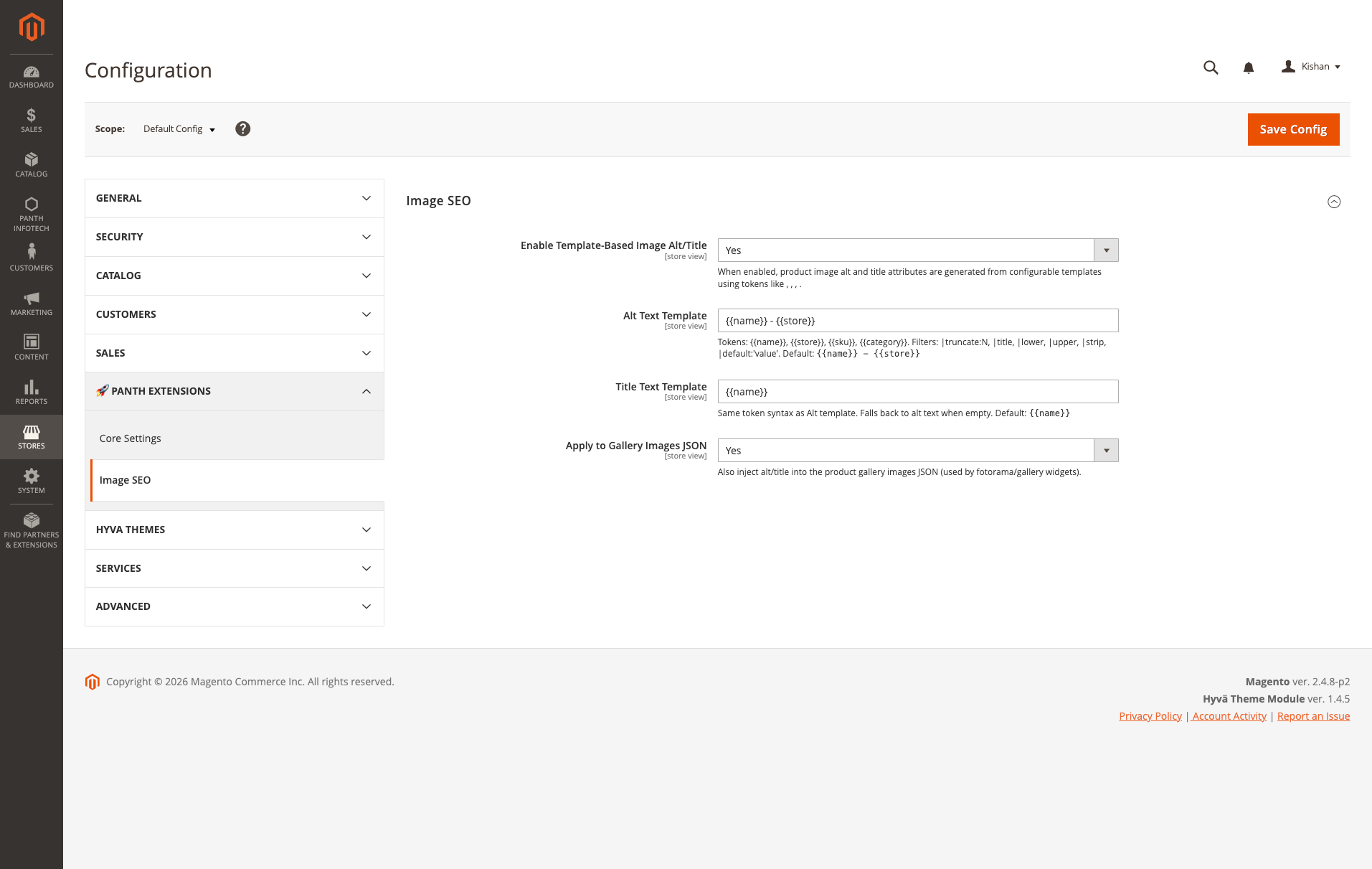
Go to Stores > Configuration > Panth Extensions > Image SEO.
| Setting | Default | What it does |
|---|---|---|
| Enable Template-Based Image Alt/Title | Yes | Master switch for all plugins. |
| Alt Text Template | {{name}} - {{store}} |
Template for the alt attribute. Validated on save: only the tokens and filters listed below are accepted, up to 255 characters. |
| Title Text Template | {{name}} |
Template for the title attribute of gallery images. When empty, the alt text is used. Validated like the alt template. |
| Apply to Gallery Images JSON | Yes | Also writes the generated text into the product gallery JSON. |
Configuration paths: panth_image_seo/image/image_seo_enabled, panth_image_seo/image/alt_template, panth_image_seo/image/title_template, panth_image_seo/image/gallery_seo_enabled.
Tokens
| Token | Value |
|---|---|
{{name}} |
Product name |
{{sku}} |
Product SKU |
{{store}} |
Name of the current store view |
{{category}} |
Name of the product's current category, when Magento has one in context (for example on a category page); empty otherwise |
Unknown tokens and filters are rejected when the configuration is saved. Separators left behind by empty tokens (-, |, commas) are cleaned up, so {{name}} - {{category}} renders as just the product name when there is no category.
Filters
Filters are appended to a token with | and run from left to right, for example {{name|lower|title|truncate:40}}.
| Filter | Effect |
|---|---|
truncate:N |
Cuts the value to N characters and appends ... (N defaults to 60 when omitted). |
title |
Title case. |
upper |
Upper case. |
lower |
Lower case. |
strip |
Removes HTML tags and collapses whitespace. |
default:'text' |
Uses text when the value is empty. |
Template examples
Alt:   {{name}} - {{store}}
Title: {{name}}
Alt:   {{name|truncate:80}} | {{store}}
Title: {{name}}
Alt:   {{name}} in {{category|default:'our catalogue'}}
Title: {{name}}
Alt:   [{{sku|upper}}] {{name}} | {{store}}
Title: {{name|truncate:60}}
For a multilingual store, set a different Alt Text Template on each store view.
Usage
Once enabled, no further action is needed. Where the text is applied:
| Surface | How |
|---|---|
| Category listings, search results, related and upsell lists, widgets | Plugin on Magento\Catalog\Block\Product\ImageFactory sets the image label to the generated alt text. |
Images rendered through Magento\Catalog\Helper\Image |
Plugins on getLabel() return the generated alt text, or the product name when no template output is available. |
Product gallery (Magento\Catalog\Block\Product\View\Gallery) |
The gallery image labels (used for the server-rendered main image on Hyva) and the gallery JSON caption and title are replaced when the existing value is empty, equals the product name or is a placeholder ("Image", "Main product photo"). Merchant-written captions are kept. "Image N of M" is appended when there is more than one image. |
Catalog image uploads (Magento\Catalog\Model\ImageUploader) |
The stored filename is normalised to a clean ASCII slug. Existing files are not renamed. |
Note: on listing and helper-rendered images the generated text replaces whatever label the image had. If you rely on hand-written labels there, keep the module switched off for that store view or make the template reproduce them.
Rendering happens on every request from the templates in configuration; nothing is written to product data, so changing a template takes effect after a cache flush.
Developer Notes
- Module name:
Panth_ImageSeo - Composer package:
mage2kishan/module-image-seo - PHP namespace:
Panth\ImageSeo - Template engine:
Panth\ImageSeo\Model\ImageSeo\AltGenerator; resolver with the configured templates:Panth\ImageSeo\Model\ImageSeo\ImageTemplateResolver(getAlt(),getTitle(),resolve()). - Extension point:
Panth\ImageSeo\Model\ImageSeo\VisionAdapterInterface. The defaultNullVisionAdapterdoes nothing; a custom adapter can be bound through a DI preference to supply generated descriptions when the generator is called with an image path. No image analysis is performed by default. - Upgrade from Panth Advanced SEO: the data patch
MigrateConfigPathsmoves saved values frompanth_seo/image/*topanth_image_seo/image/*duringsetup:upgrade. When a value already exists under the new path for the same scope, the existing value is kept and the legacy row is left in place. - ACL resource for the configuration section:
Panth_ImageSeo::config
Uninstallation
bin/magento module:disable Panth_ImageSeo
composer remove mage2kishan/module-image-seo
bin/magento setup:upgrade
bin/magento setup:di:compile
bin/magento cache:flush
The module creates no database tables and does not modify product data. Configuration values remain in core_config_data until removed. Filenames that were normalised at upload time are not changed back.
Support
- Product page: kishansavaliya.com/magento-2-image-seo.html
- Contact: kishansavaliya.com/contact
- Email: kishansavaliyakb@gmail.com
- Bug reports: GitHub issues
License
Free and open source under the MIT License. See LICENSE.txt.
Changelog
See CHANGELOG.md.
Links
- Website: kishansavaliya.com
- All extensions: kishansavaliya.com/magento-extensions.html
- GitHub: mage2sk/module-image-seo
- Packagist: mage2kishan/module-image-seo
This content is fetched directly from the module's GitHub repository. We are not the authors of this content and take no responsibility for its accuracy, completeness, or any consequences arising from its use.