Magendoo Catalog Quality
magendoo/module-catalog-quality 71
Scores every product against an enrichment and consistency model into a 0-100 Product Health Score (graded A-E), surfacing incomplete products, a filter-blind detector for products missing filterable attribute values, and a filter coverage heatmap, with a revenue-weighted Catalog Health Index dashboard.
Build Tests
Code Quality
Release Discipline
Release history audited up to v2.0.0
Tested on Magento 2.4.9
Recent Test History
Each release is tested against the latest Magento version at that time.
Top Contributors
View Leaderboard
Share This Module's Status
README
Loaded from GitHubMagendoo Catalog Quality — Magento 2 Module
Catalog data quality observability for Magento 2.
Know exactly which products are hurting your conversion rate before your customers find out.
What It Does
Magendoo_CatalogQuality scores every product in your catalog against a two-axis quality model — Enrichment (are the important attributes filled in?) and Consistency (do they meet your content rules?) — and combines them into a single Product Health Score (PHS) between 0 and 100. Products are graded A–E.
The module answers three questions that every Magento merchant needs:
- Which products are incomplete? — The Gap List shows every product's grade, PHS, priority gaps, and the specific missing attribute codes.
- Which products are invisible in layered navigation? — The Filter-Blind detector flags products that have no value for a filterable attribute, making them unfindable when shoppers use your category filters.
- Which filter attributes have the worst coverage across categories? — The Filter Coverage Matrix shows fill rates as a colour-coded heatmap, scoped by attribute set.
No auto-fix. Just clear, actionable diagnostic data.
Screenshots
Dashboard
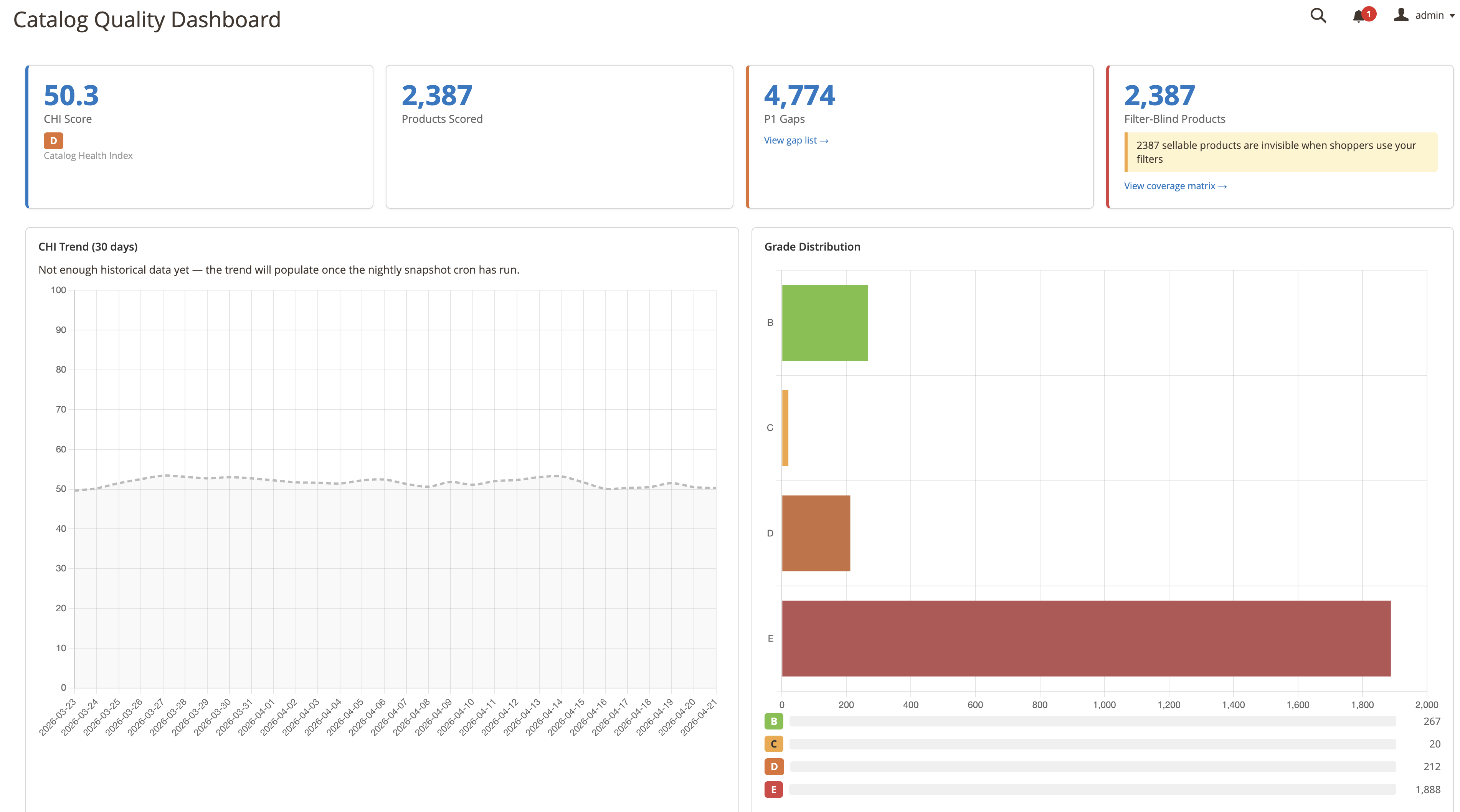
The dashboard shows the Catalog Health Index (CHI) — an aggregate PHS across all scored products of the default store view, weighted by 90-day product revenue when revenue weighting is enabled and sales data exists — alongside grade distribution, filter-blind product count, and a 30-day CHI trend chart.
Product Gap List
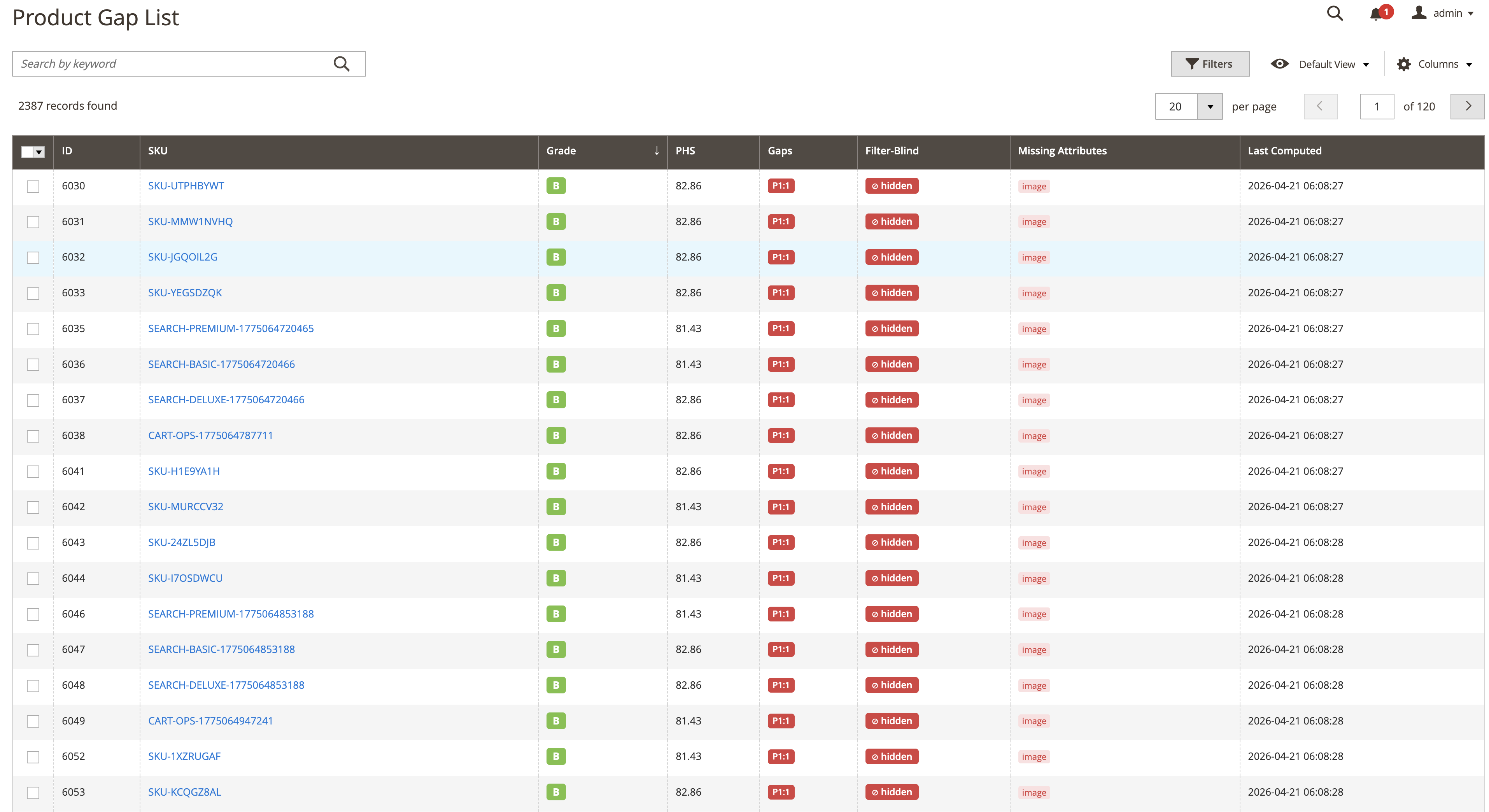
Every scored product in one grid: grade badge, PHS, P1/P2/P3 gap counts, a filter-blind chip, and colour-coded missing attribute chips. Red chips are filterable attributes directly causing filter-blindness; grey chips are other priority gaps.
Filter Coverage Matrix
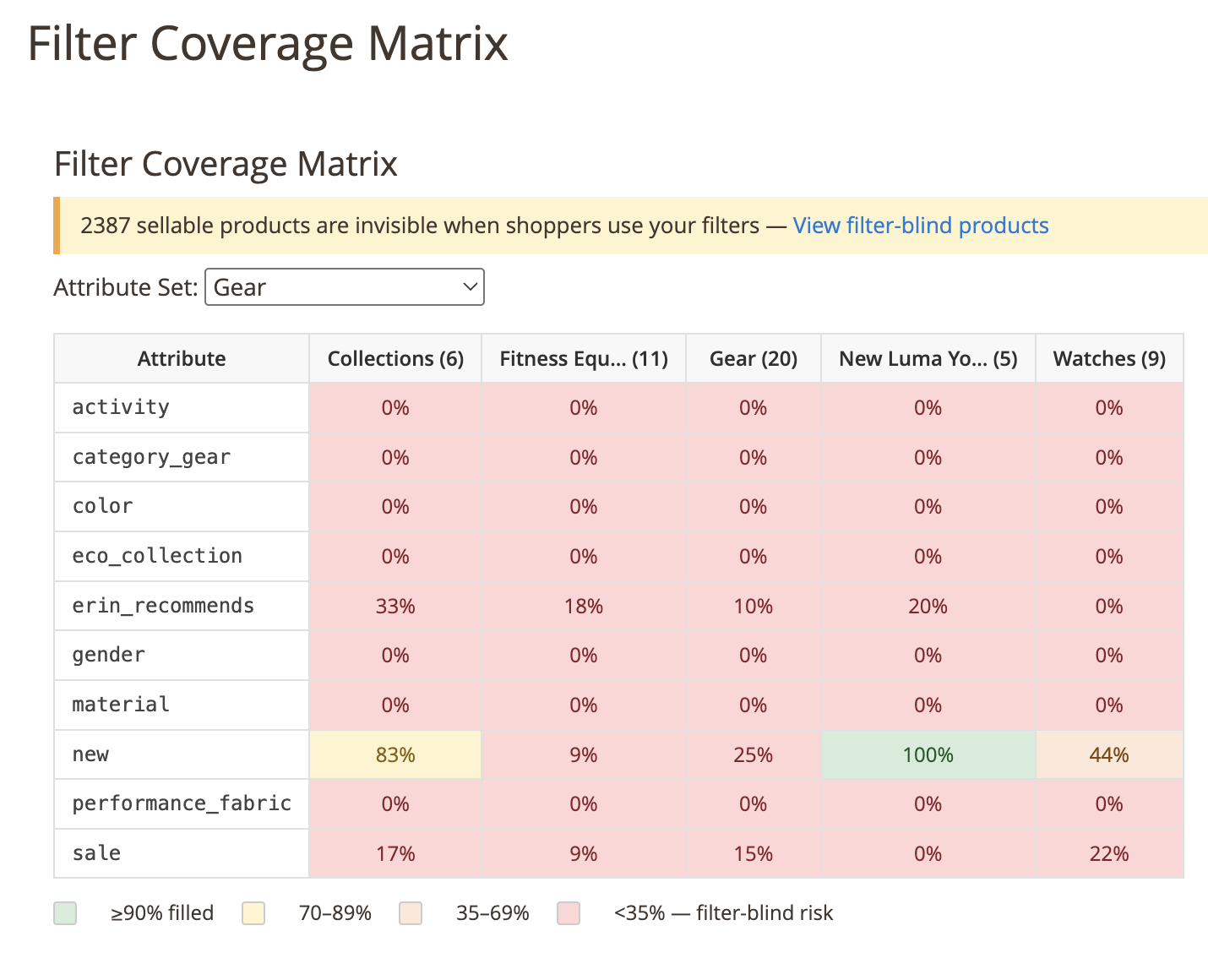
Rows are user-defined filterable attributes; columns are active categories (filterable by attribute set). Each cell shows the fill-rate percentage, colour-coded from green (≥90 %) to red (<35 %). The callout above the matrix links to the Gap List for drilling into individual filter-blind products.
Attribute Priorities
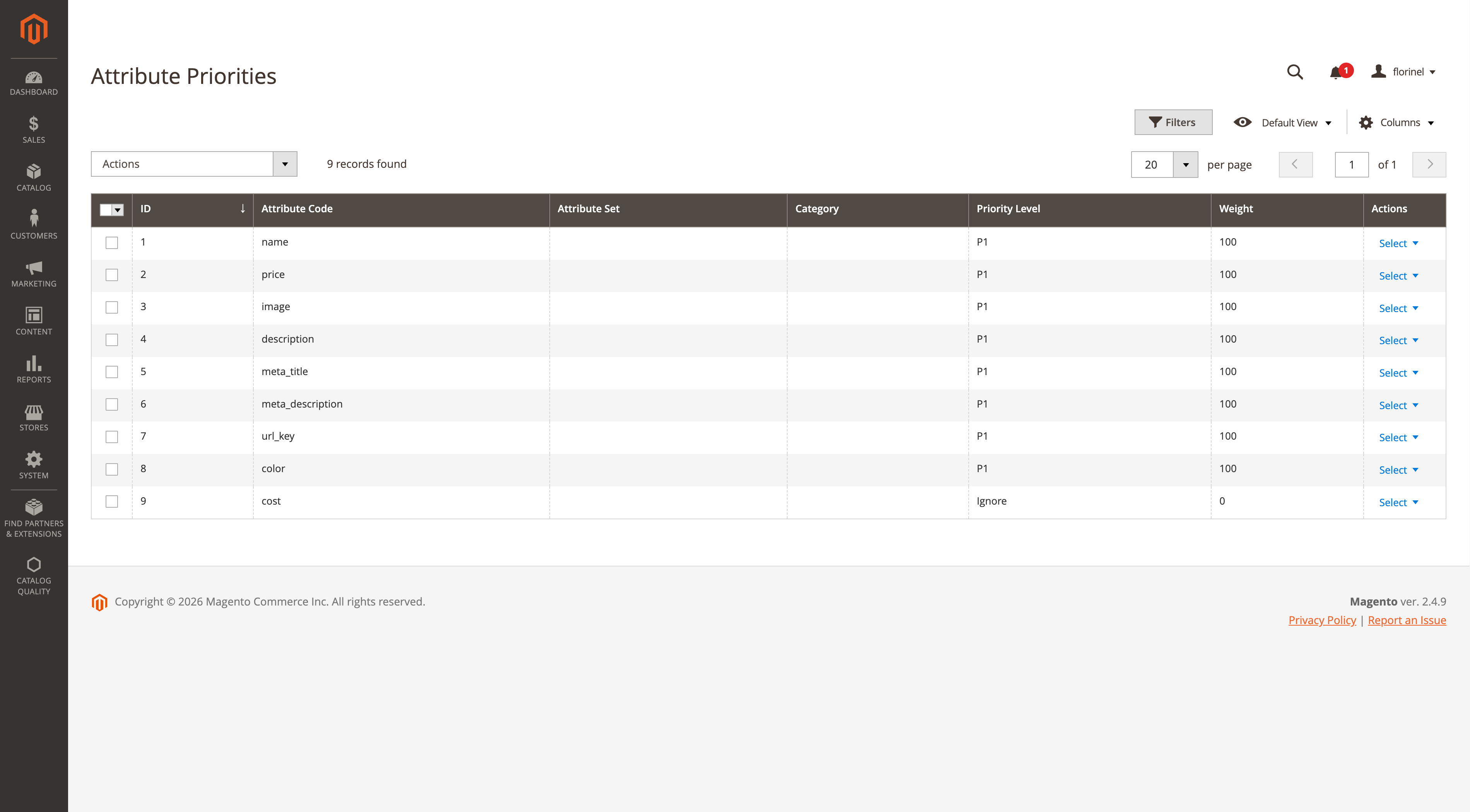
The priority grid controls how much each attribute matters to the score. Priority levels are inline-editable; every change is audited and marks the score index for rebuild.
Features
- Two-axis PHS scoring: Enrichment completeness × Consistency conformance multipliers
- A–E grade thresholds: ≥90 → A, ≥80 → B, ≥70 → C, ≥50 → D, <50 → E
- Revenue-weighted CHI: weights products by 90-day revenue (order totals minus refunds, processing/complete orders); falls back to the equal-weighted average when no revenue exists
- Filter-blind detection: flags products invisible in layered navigation per store view, considering only filterable attributes that belong to the product's own attribute set
- Attribute Priority System: P1/P2/P3/P4/Ignore per attribute, with category and attribute-set overrides; every change is audited and marks the score index for rebuild
- Placeholder blocklist: regex and literal patterns to catch values like "N/A", "TBD", "Lorem ipsum"
- 9 built-in quality rules: Meta Title, Meta Description, URL Key, Name, Description, Image, Price, Filterable Attribute, Category Assignment — each rule's enabled flag and severity come from the
magendoo_cq_rule_configtable - Conditional attribute groups: score module-specific attributes only when their control flag is on (e.g. base-price fields only when
baseprice_is_enabled = 1) - Magento indexer integration: incremental updates via MView subscriptions on the product entity, EAV value, and category-assignment tables; full reindex via CLI
- Nightly CHI snapshots: 30-day trend data stored automatically via cron (one row per store view per UTC day)
- CSV export of the priority table via CLI (
catalog-quality:priorities:export) - REST API: 6 endpoints for scores and priorities
- Inline-editable Priority Grid: change priority levels without leaving the listing
- Filter Coverage Matrix: attribute set filter, product counts per category column
- UTC everywhere: all timestamps the module writes (score computation times, priority history, snapshots, run logs) are UTC
Requirements
| Dependency | Version |
|---|---|
| PHP | ≥ 8.2 |
| Magento Open Source / Adobe Commerce | 2.4.x |
magento/framework |
≥ 103.0 |
magento/module-catalog |
≥ 104.0 |
Installation
Via Composer (recommended)
Until the package is listed on Packagist, add the GitHub repository first:
composer config repositories.magendoo-catalog-quality vcs https://github.com/magendooro/magento2-catalog-quality
Then install:
composer require magendoo/module-catalog-quality
bin/magento module:enable Magendoo_CatalogQuality
bin/magento setup:upgrade
bin/magento setup:di:compile
bin/magento setup:static-content:deploy -f
bin/magento cache:flush
Manual
- Copy the module directory into
app/code/Magendoo/CatalogQuality/ - Run the same CLI commands above
Upgrading from 1.x to 2.0
Version 2.0.0 tightens the database schema: setup:upgrade adds foreign keys to the
score and priority tables plus unique constraints on
magendoo_cq_priority (attribute_id, attribute_set_id, category_id) and
magendoo_cq_catalog_snapshot (store_view_id, snapshot_date). MySQL refuses to add
a unique constraint while duplicate rows exist, so on a 1.x install you must run
Setup/orphan-cleanup.sql against your database before
setup:upgrade — it removes orphaned score rows and deduplicates both tables
(1.x could accumulate duplicates via repeated bulk priority upserts and same-day
snapshot cron re-runs). Skipping this step can abort setup:upgrade mid-run with a
"Duplicate entry" error. The script is idempotent; on installs with a DB table
prefix, prefix the table names before running.
2.0.0 also contains breaking API changes for code extending the module:
Magendoo\CatalogQuality\Api\ScorerInterfacegained the methodscoreBatch(array $productIds, int $storeViewId): int. Custom scorer implementations must implement it.ScorerInterface::score()now throwsNoSuchEntityExceptionfor a product ID that does not exist instead of persisting and returning an empty E-grade score row.
Initial Setup
After installation, run the full indexer to score all products:
bin/magento indexer:reindex magendoo_cq_product_score
This may take several minutes on large catalogs. The batch size is configurable under Stores → Configuration → Magendoo Extensions → Catalog Quality → Performance.
Once the reindex finishes, open Catalog Quality → Dashboard in the admin menu: start with the worst grades in the Gap List, fix the missing P1 attributes, and watch the CHI climb on the next reindex.
Admin Screens
Navigate to Catalog Quality in the top-level admin menu.
| Screen | URL | Description |
|---|---|---|
| Dashboard | /catalogquality/dashboard/index |
CHI, grade distribution, filter-blind count, 30-day trend |
| Product Gap List | /catalogquality/gaps/index |
All scored products; filterable by grade, filter-blind status |
| Filter Coverage Matrix | /catalogquality/filters/index |
Attribute fill-rate heatmap per category |
| Attribute Priorities | /catalogquality/priority/index |
Inline-editable priority rules |
Configuration
Stores → Configuration → Magendoo Extensions → Catalog Quality
| Setting | Default | Behavior |
|---|---|---|
| Enabled | Yes | Master switch. When disabled, the score indexer skips both full and incremental runs, and the snapshot/prune cron jobs exit without touching the database. |
| Revenue-weighted CHI | Yes | When enabled, the dashboard CHI and the nightly snapshot use the revenue-weighted average whenever the store view has order revenue in the 90-day window; without revenue (or with the setting off) the equal-weighted average of all PHS values is used. |
| Indexer Batch Size | 500 | Number of products scored per batch during full reindex and incremental (MView) processing. The --batch CLI option overrides it for a single run. |
| Snapshot Retention | 90 days | The weekly prune cron deletes CHI snapshots older than this many days. |
Cron schedule: snapshots are written daily at 02:00 (magendoo_cq_rebuild_snapshot); old snapshots are pruned Sundays at 03:00 (magendoo_cq_prune_snapshots).
Scoring Algorithm
See docs/scoring-algorithm.md for the full specification.
Summary:
PHS(product, store_view) =
    [Σ weight(attr) × completeness_score(attr) × conformance_mult(attr)] / [Σ weight(attr)]
    × product_rule_mult                     ← product-level rules (category assignment)
    × 100

completeness_score:  empty / placeholder → 0.0 | present → 0.5 | meets_bar → 1.0
conformance_mult:    1.0 baseline; per failed rule the multiplier for the rule's
                     configured severity: critical × 0.7, warning × 0.9, info × 1.0

CHI = Σ(revenue_90d × PHS) / Σ(revenue_90d)     (falls back to equal-weight)
Rule severities and enabled flags live in the magendoo_cq_rule_config table — disabled rules are skipped entirely.
Priority System
See docs/priority-system.md for the full hierarchy.
Quick reference:
| Level | Weight | Meaning |
|---|---|---|
| P1 | 100 | Critical — directly impacts conversions (name, price, image, meta) |
| P2 | 50 | Important — filterable attributes auto-floor here |
| P3 | 20 | Standard — user-defined attributes not yet classified |
| P4 | 5 | Low — nice-to-have |
| Ignore | 0 | Never scored (system attrs, optional promotional fields) |
Priority resolution order (first match wins):
- Explicit row with matching
category_id - Explicit row with matching
attribute_set_id - Explicit global row (no set, no category)
- Implicit: SEO attrs → P1; user-defined filterable → P2; user-defined → P3; else → Ignore
Priority rules are unique per (attribute, attribute set, category) scope — saving the same scope again updates the existing row instead of creating a duplicate. Every create, change, and delete is recorded in magendoo_cq_priority_history and marks the score indexer invalid, so scores refresh on the next reindex.
Conditional Attribute Groups
Some module attributes should only be scored when they are relevant for a specific product. Configure this in etc/di.xml:
<type name="Magendoo\CatalogQuality\Model\Scoring\ProductScorer">
    <arguments>
        <argument name="conditionalGroups" xsi:type="array">
            <item name="baseprice" xsi:type="array">
                <item name="enabledBy" xsi:type="string">baseprice_is_enabled</item>
                <item name="attributes" xsi:type="array">
                    <item name="0" xsi:type="string">baseprice_product_amount</item>
                    <item name="1" xsi:type="string">baseprice_unit_id</item>
                    <item name="2" xsi:type="string">baseprice_reference_amount</item>
                </item>
            </item>
        </argument>
    </arguments>
</type>
The enabledBy attribute is never scored itself — it acts as a gate. The listed attributes are only evaluated when the gate attribute is truthy (1). The example above wires up Magendoo_BasePrice so that unit-pricing compliance fields only count as gaps on products where base pricing is switched on.
CLI Commands
# Full reindex — score all products, optionally scoped to one store view
bin/magento catalog-quality:rebuild [--store=<store_view_id>] [--batch=<size>]
--storelimits the rebuild to a single store view. The ID is validated; an unknown ID fails with a message listing the valid store view IDs. Without it, all store views are scored.--batchoverrides the configured batch size for this run (must be a positive integer).- The command reports the number of product-store pairs scored and the elapsed time.
# Debug a single product (table output by default)
bin/magento catalog-quality:score <sku> [--store=<store_view_id>] [--format=table|json]
# Example JSON output (--format=json):
# {"sku":"WH-X500","store_view_id":1,"phs":42.15,"grade":"D","filter_blind":true,
#  "p1_gaps":1,"p2_gaps":2,"p3_gaps":0,"missing_attrs":["cq_connectivity","cq_color"],
#  "rules_failed":["name_quality","meta_description_quality"]}

# Export priorities as CSV (stdout by default)
bin/magento catalog-quality:priorities:export [--set=<attribute_set_id>] [--output=<file>]
REST API
See docs/rest-api.md for request/response schemas.
| Method | Endpoint | Description |
|---|---|---|
GET |
/V1/catalog-quality/scores/:sku |
Get quality score for a single SKU |
GET |
/V1/catalog-quality/gaps |
List gap records (supports search criteria) |
POST |
/V1/catalog-quality/priorities |
Create or update a single priority rule (upsert per scope) |
POST |
/V1/catalog-quality/priorities/bulk |
Bulk upsert priority rules; returns the number of rows created or changed |
GET |
/V1/catalog-quality/priorities |
List priority rules |
DELETE |
/V1/catalog-quality/priorities/:id |
Delete a priority rule |
All endpoints require an admin bearer token. Authenticate with POST /V1/integration/admin/token. Priority writes validate the priority_level value (400 on invalid input), are audited to magendoo_cq_priority_history, and invalidate the score indexer.
Database Tables
| Table | Purpose |
|---|---|
magendoo_cq_priority |
Attribute priority rules (P1–P4/Ignore), unique per attribute, set, and category |
magendoo_cq_priority_history |
Audit log of priority creates, changes, and deletes |
magendoo_cq_product_score |
Per-product PHS, grade, gap counts, filter-blind flag |
magendoo_cq_attribute_score |
Per-attribute value states for a product |
magendoo_cq_catalog_snapshot |
Nightly CHI snapshots (equal- and revenue-weighted) for trend charts |
magendoo_cq_scope_profile |
Named scope profiles — roadmap: the table and default profiles ship today, but scoring does not consume them yet |
magendoo_cq_rule_config |
Per-rule enabled/severity/parameter configuration (drives conformance penalties) |
magendoo_cq_placeholder_blocklist |
Literal and regex patterns for placeholder detection |
magendoo_cq_remediation_queue |
Remediation work queues — roadmap: table ships today, no queue processing yet |
magendoo_cq_remediation_queue_item |
Items within a remediation queue — roadmap, same status |
magendoo_cq_rule_run_log |
Indexer/CLI run audit log |
Extending
Adding a Custom Quality Rule
- Implement
Magendoo\CatalogQuality\Api\RuleInterface - Register it in
etc/di.xmlunderRulePool
<type name="Magendoo\CatalogQuality\Model\Rule\RulePool">
    <arguments>
        <argument name="rules" xsi:type="array">
            <item name="my_custom_rule" xsi:type="object">
                Vendor\Module\Model\Rule\Enrichment\MyCustomRule
            </item>
        </argument>
    </arguments>
</type>
Optionally seed a magendoo_cq_rule_config row for the new rule code to control its severity; rules without a config row run as enabled with warning severity.
Adding a Conditional Attribute Group
Register a conditionalGroups item as shown in the Conditional Attribute Groups section above.
Running the Tests
Pure unit tests live under Test/Unit and run with Magento's standard unit-test configuration (no database required):
vendor/bin/phpunit -c dev/tests/unit/phpunit.xml.dist app/code/Magendoo/CatalogQuality/Test/Unit
License
MIT — © 2025 Magendoo Interactive
This content is fetched directly from the module's GitHub repository. We are not the authors of this content and take no responsibility for its accuracy, completeness, or any consequences arising from its use.