Build Tests
Code Quality
Release Discipline
Release history audited up to vv1.1.0
Tested on Magento 2.4.9
Recent Test History
Each release is tested against the latest Magento version at that time.
Top Contributors
View Leaderboard

Share This Module's Status
README
Loaded from GitHubMagento 2 Log Viewer
A Magento 2 module to view and manage log files directly from the admin panel.
Installation
Install from Packagist:
composer require rjds/magento2-module-log-viewer
bin/magento module:enable Rjds_LogViewer
bin/magento setup:upgrade
bin/magento cache:flush
Overview
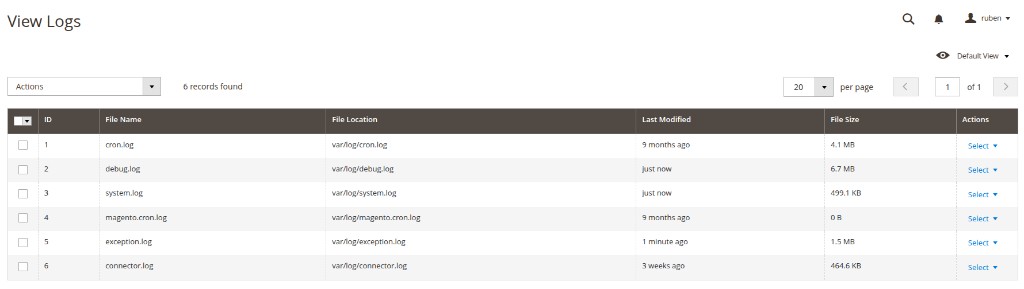
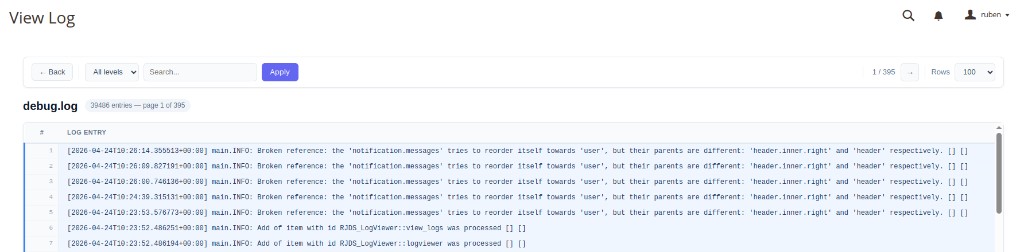
View Magento logs from the backend without SSH or filesystem access. The module provides an admin interface to:
- list available log files
- inspect log contents
- filter and search entries
- safely clear log files when needed
Quick Start
- Go to Magento Admin.
- Navigate to Reports > Log Viewer > View Logs.
- Select a log file (for example
system.log,exception.log, ordebug.log). - Review entries and apply filters/search as needed.
Screenshots
View Logs
View Log
Configure permissions
Grant access to the Log Viewer in System > Permissions > User Roles.
Make sure administrators who need this feature have the appropriate ACL resource enabled.
Development
composer install
For local development in Magento:
bin/magento setup:upgrade
bin/magento cache:flush
Run your project quality checks (PHPStan, PHPCS, PHPUnit, etc.) according to your repository setup.
Contributing
Contributions are welcome. See CONTRIBUTING.md for contribution guidelines, commit conventions, and pull request workflow.
Migrations
If future major versions introduce breaking changes, migration notes will be documented in MIGRATION.md.
License
This project is released under the MIT License.
See LICENSE for details and CHANGELOG.md for release history.
This content is fetched directly from the module's GitHub repository. We are not the authors of this content and take no responsibility for its accuracy, completeness, or any consequences arising from its use.