Build Tests
Code Quality
Release Discipline
Release history audited up to v1.0.0
Tested on Magento 2.4.9
Recent Test History
Each release is tested against the latest Magento version at that time.
Top Contributors
View Leaderboard
Share This Module's Status
README
Loaded from GitHubAdditionalShippingBlock - Magento 2 Module
Main Functionality
This module lets you add a block in the desired placement position within the shipping method on the checkout page.
Installation
* = in production please use the --keep-generated option
Type 1: Composer (recommended)
- Install the module composer by running
composer require sndsabin/module-additionalshippingblock - enable the module by running
php bin/magento module:enable SNDSABIN_AdditionalShippingBlock - apply database updates by running
php bin/magento setup:upgrade* - Flush the cache by running
php bin/magento cache:flush
Type 2: Zip file
- Unzip the zip file or git clone(
git clone https://github.com/sndsabin/AdditionalShippingBlock.git) this repo inapp/code/SNDSABIN/. - Enable the module by running
php bin/magento module:enable SNDSABIN_AdditionalShippingBlock - Apply database updates by running
php bin/magento setup:upgrade* - Flush the cache by running
php bin/magento cache:flush
Configuration
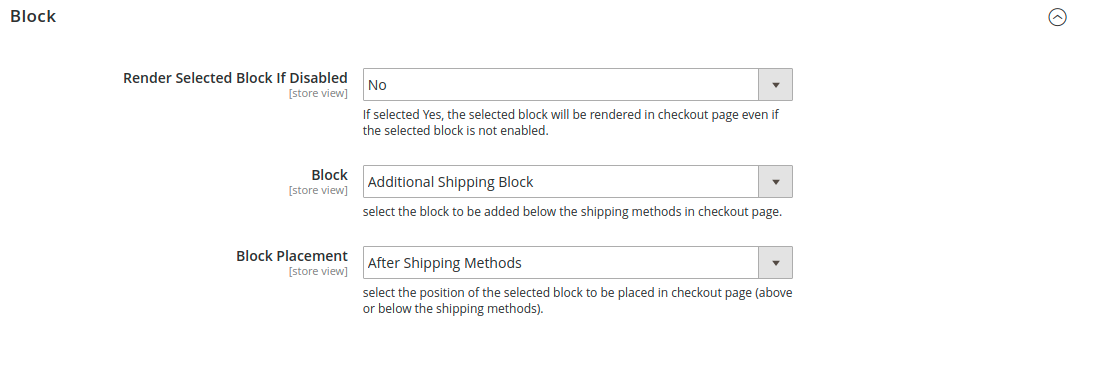
Block
-
Select Block to be rendered on the checkout page
- Stores > Configuration > Additional Shipping Block > View Settings > Block > Block
- select the block to be added above/below the shipping methods on the checkout page.

-
Select the block placement
-
Stores > Configuration > Additional Shipping Block > View Settings > Block > Block Placement
- select the position of the selected block to be placed on the checkout page (above or below the shipping methods).
Default Option: After Shipping Methods

3 Render Selected Block Even if it's not enabled (optional)
-
Stores > Configuration > Additional Shipping Block > View Settings > Block > Render Selected Block If Disabled
-
select the Yes / No Option (If selected Yes, the selected block will be rendered on the checkout page even if the selected block is not enabled.)
Default Option: No

General

- Make the selected block visible on the checkout page
-
Stores > Configuration > Additional Shipping Block > View Settings > General > Enabled
-
select the Yes / No Option (If enabled, the assigned block will be visible in the desired position within the shipping method on the checkout page.)
Default Option: Yes
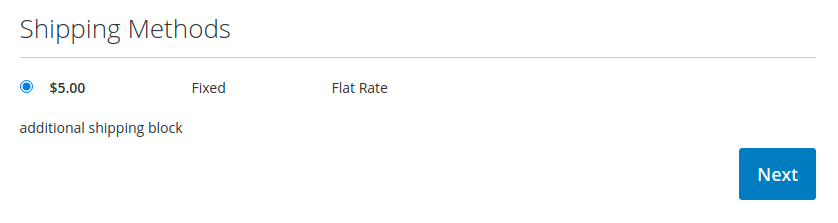
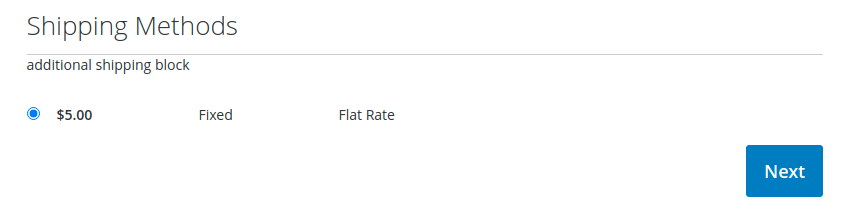
Frontend Checkout Page
Block Placement : After Shipping Methods
Block Placement : Before Shipping Methods
Template css class
There are two classes added to the div element in the template additional-shipping-block-container and additional-shipping-block-content if in case you need to use it.

License
Uppercase Vendor Name 😛 ?
Yes 😄
Bootstrapped using Mage2Gen. Inspired from magento2-module-additional-shipping-block.
This content is fetched directly from the module's GitHub repository. We are not the authors of this content and take no responsibility for its accuracy, completeness, or any consequences arising from its use.