Admin Grid AI
tonsoflimes/magento-module-admin-grid-ai 20
Enhances Magento admin grids with AI-powered natural language queries, allowing administrators to search, filter, sort, and manage columns using plain English. Supports OpenAI, OpenRouter, and custom LLM gateways.
Build Tests
Code Quality
Release Discipline
Release history audited up to v0.0.2
Tested on Magento 2.4.9
Recent Test History
Each release is tested against the latest Magento version at that time.
Top Contributors
View Leaderboard
Looking for Contributors
Composer installation fails. Your contribution could help the entire Magento community!
Share This Module's Status
README
Loaded from GitHubAdmin Grid AI for Magento 2
A powerful Magento 2 module that enhances admin grids with AI capabilities, allowing administrators to interact with grid data using natural language. Search, filter, sort, and manage columns in any UI Component grid using AI-powered queries.
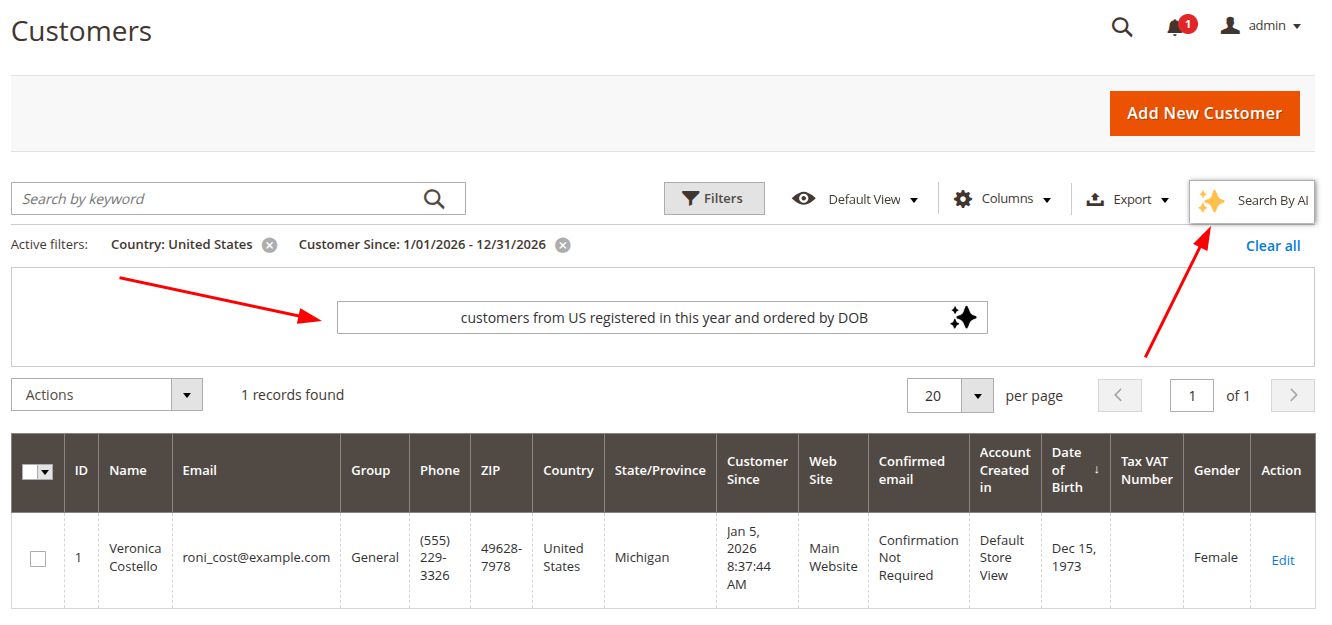
Features
- 🤖 Natural Language Queries - Use plain English to search and filter grid data
- 🔍 Smart Filtering - AI automatically applies appropriate filters based on your query
- 📊 Column Management - Show/hide columns through natural language commands
- 🔄 Sorting Control - Sort data using conversational instructions
- 🔌 Multiple LLM Gateways - Support for OpenAI, OpenRouter, and custom OpenAI-compatible APIs
- ⚡ UI Component Compatible - Works with all Magento 2 UI Component grids
Requirements
- PHP 8.2, 8.3, or 8.4
- Magento 2.4.x or higher
- OpenAI API key or compatible LLM gateway
Installation
Install the module via Composer using the meta package:
composer require tonsoflimes/magento-admin-grid-ai-meta

php bin/magento module:enable TonsOfLimes_AdminGridAI
php bin/magento setup:upgrade
php bin/magento setup:di:compile
php bin/magento setup:static-content:deploy -f
Configuration
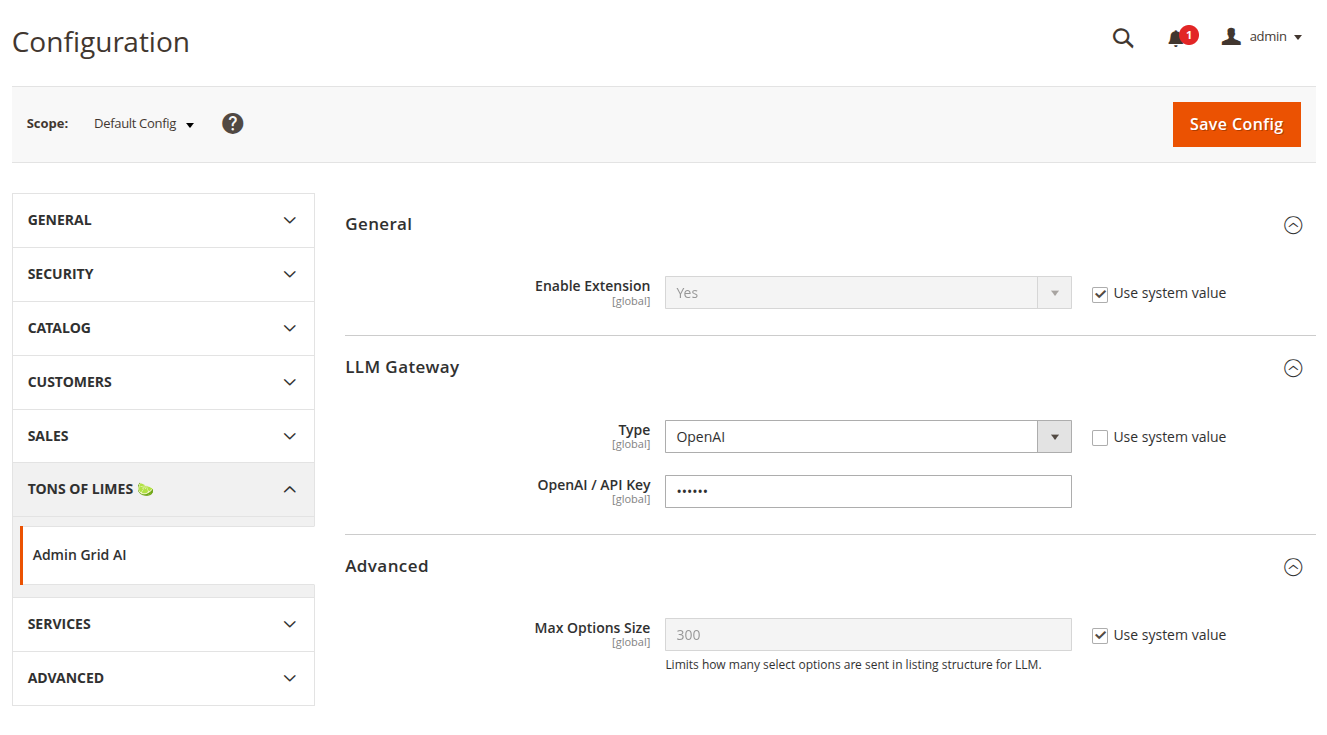
Navigate to Stores > Configuration > tons of limes 🍋🟩 > Admin Grid AI
General Settings
- Enable Extension: Set to "Yes" to activate AI features across admin grids
LLM Gateway Configuration
Choose your preferred LLM gateway type and configure the credentials:
Option A: OpenAI
- Set Type to "OpenAI"
- Enter your OpenAI API Key
Option B: OpenRouter
- Set Type to "OpenRouter"
- Enter Base URI (default:
https://openrouter.ai/api/v1) - Enter your OpenRouter API Key
Option C: Custom Gateway
Custom OpenAI-compatible API gateway (e.g. self-hosted LLM)
- Set Type to "Custom Gateway"
- Enter your Custom Base URI
- Enter your Custom API Key
Advanced Settings
- Max Options Size: Limits the number of select options sent to the LLM (default: 300)
- Helps optimize API requests for grids with large option sets
Usage
Once configured, the "Search by AI" feature will be available on all UI Component grids in the Magento admin panel.
How to Use
- Navigate to any admin grid (e.g., Products, Orders, Customers)
- Look for the Search by AI interface in the grid toolbar
- Enter your natural language query, such as:
- "Show only enabled products"
- "Display orders from last month"
- "Filter customers from New York"
- "Sort by price descending"
- "Hide SKU and weight columns"
- The AI will interpret your request and apply the appropriate filters, sorting, or column visibility changes
Example Queries
Filtering:
- "Show products with stock quantity less than 10"
- "Display orders with status pending"
- "Filter by customers who registered this year"
Sorting:
- "Sort by created date, newest first"
- "Order by price from high to low"
Column Management:
- "Show only name, SKU, and price columns"
- "Hide all attribute columns"
Combined Actions:
- "Show enabled products sorted by price, hide description column"
Limitations
- Only works with UI Component grids (not legacy grids)
- Query interpretation depends on LLM model capabilities
Support
For issues, feature requests, or contributions, please visit:
- GitHub: tons-of-limes
Author
tons of limes 🍋🟩
Copyright © tons of limes. All rights reserved.
This content is fetched directly from the module's GitHub repository. We are not the authors of this content and take no responsibility for its accuracy, completeness, or any consequences arising from its use.