Azure AD B2C SSO for Magento 2
wika-group/magento2-azure-ad-b2c-sso 59
Adds customer login via Azure AD B2C single sign-on, creating Magento customers from the B2C response with events for extending profile and address data, plus autologin and logout handling.
Build Tests
Code Quality
Release Discipline
Release history audited up to v1.16.0
Tested on Magento 2.4.9
Recent Test History
Each release is tested against the latest Magento version at that time.
Top Contributors
View Leaderboard

Share This Module's Status
README
Loaded from GitHubMage2 Module WIKA Azure B2C
Magento2 Module to add support for a login via Azure B2C.
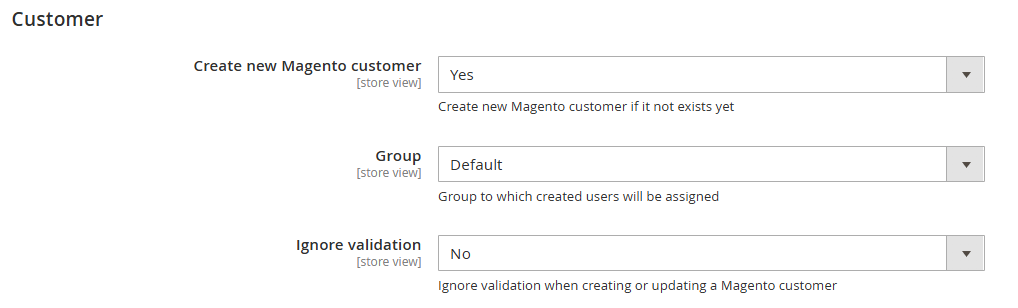
This module can create a new Magento customer. It only sets the email, firstname and lastname.
If you want to fill other fields or store an address, you can use the events.
Important: Ensure that the email address is delivered in the Azure B2C response.
Table of contents
Installation
This Magento2 module can be installed using composer:
> composer require wika-group/magento2-azure-ad-b2c-sso
To remove it from the list of required packages use the following command:
> composer remove wika-group/magento2-azure-ad-b2c-sso
Updating to latest version
With the following command composer checks all packages in the composer.json for the latest version:
> composer update
If you only want to check this package for newer versions, you can use
> composer update wika-group/magento2-azure-ad-b2c-sso
Configuration
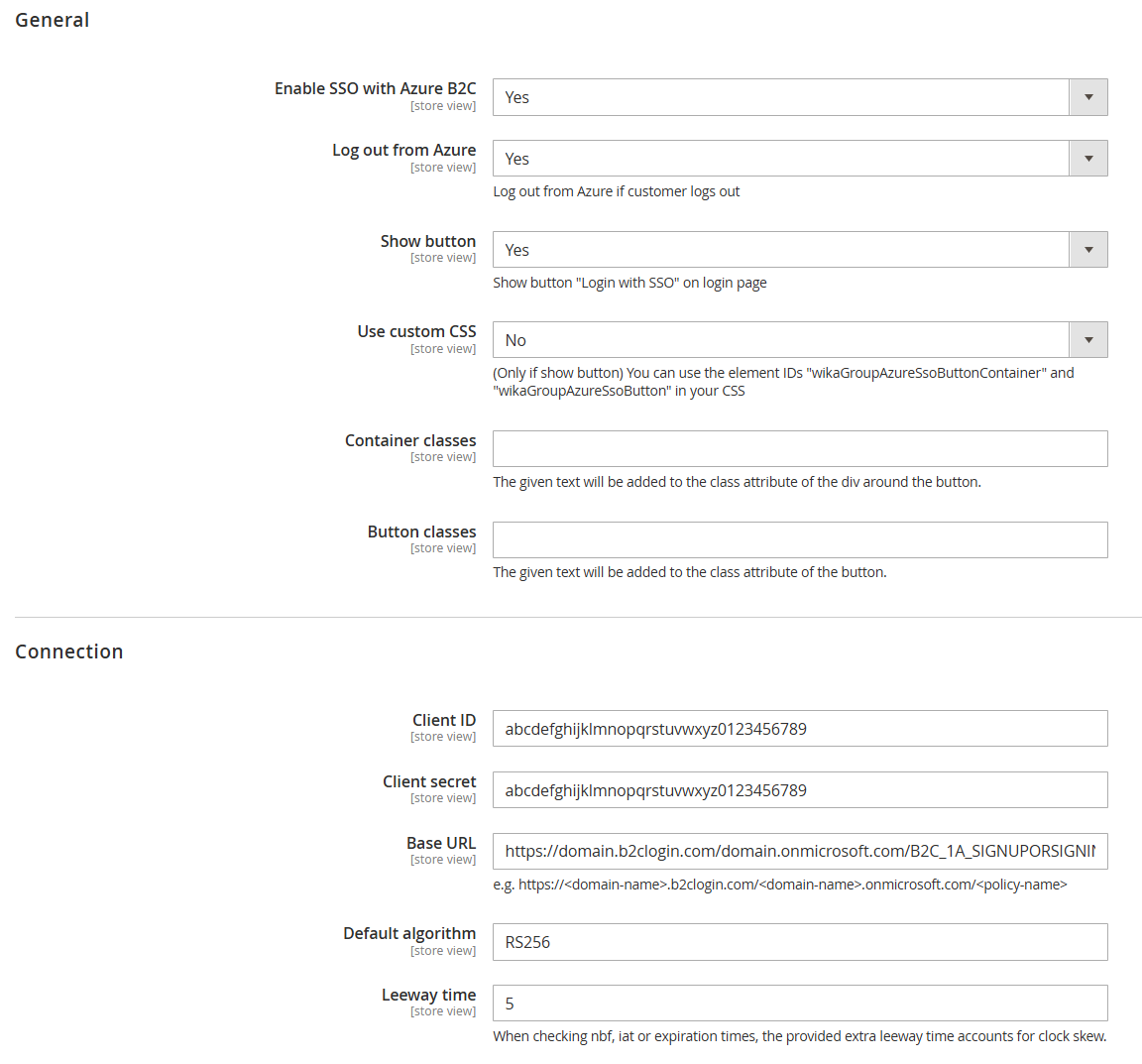
The configuration can be found in the admin backend under:
Stores -> Settings -> Configuration -> WIKA GROUP -> Azure B2C
If you do not want to use the provided button, you can disable it with the "Show button" setting.
To trigger the redirect to Azure for the login, call the route <your-domain>/azureb2c/login/authorize.
The response will be processed from the controller <your-domain>/azureb2c/login/callback.
Autologin after registration in B2C
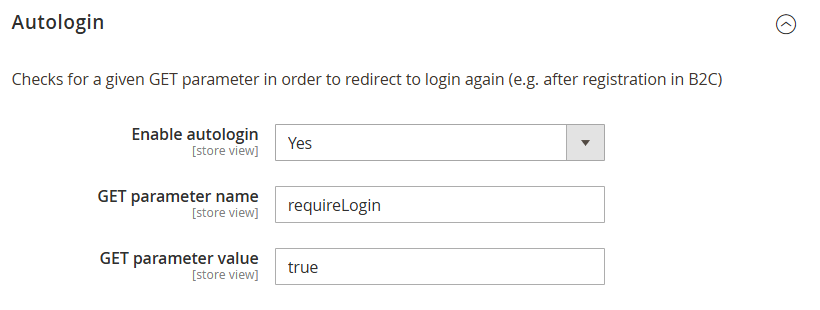
The first time a customer is registrating on the shop, the redirect after the registration takes them back to the shop.
But the shop doesn't know that the user is logged in.
For this scenario, a GET parameter can be used to automatically redirect the user to the login again.
As the customer is already logged in in B2C, no input is required and a redirect will lead back to the shop, but now the customer will also be logged in to the shop.
Log out from Azure B2C
In the admin backend, you can enable logout from Azure B2C after the customer has logged out from Magento.
The observer for the customer_logout_after event will check if the logout from Azure B2C is enabled and will redirect to the logout URI from Azure B2C.
Call authorize with referer
By default the authorize controller will read the referer from the request header, store it in the session and redirect back to it in the callback controller.
You can pass a referer as GET parameter to customize the redirect:
<your-domain>/azureb2c/login/authorize?referer=<your-customer-referer-uri>
Events
customer_login
Observers for the event customer_login will be triggered if a customer uses Azure B2C to login.
customer_logout_after
The extension adds an additional event after the Session model executed the logout logic.
customer_logout is a default event triggered by the Session model before the logout is done.
customer_logout_after is triggered after the logout logic in the Session::logout function is executed.
azure_b2c_sso_[create|update]_customer_after
The extension triggers an event after a new customer was created and after a customer has been updated.
The event azure_b2c_sso_create_customer_after is triggered after this module created a new magento customer.
The event azure_b2c_sso_update_customer_after is triggered after this module updated a magento customer. The update also happends after a customer was created.
More details in official documentation
Usage of the events
<vendor_name>/<module_name>/etc/events.xml
<?xml version="1.0"?>
<config xmlns:xsi="http://www.w3.org/2001/XMLSchema-instance" xsi:noNamespaceSchemaLocation="urn:magento:framework:Event/etc/events.xsd">
    <event name="azure_b2c_sso_create_customer_after">
        <observer name="<vendor_name>_sso_create_customer_after" instance="<vendor_name>\<module_name>\Observer\SsoCreatedCustomer"/>
    </event>
    <event name="azure_b2c_sso_update_customer_after">
        <observer name="<vendor_name>_sso_update_customer_after" instance="<vendor_name>\<module_name>\Observer\SsoUpdatedCustomer"/>
    </event>
</config>
<vendor_name><module_name>\Observer\SsoCreatedCustomer.php or <vendor_name><module_name>\Observer\SsoUpdatedCustomer.php
<?php

namespace <vendor_name>\<module_name>\Observer;

use Magento\Framework\Event\ObserverInterface;

class SsoCreatedCustomer implements ObserverInterface
{
    public function execute(\Magento\Framework\Event\Observer $observer)
    {
        $userData = $observer->getData('user_data');
        // Do some work with that data...
        $familyName = $userData['family_name'];
    }
}
This content is fetched directly from the module's GitHub repository. We are not the authors of this content and take no responsibility for its accuracy, completeness, or any consequences arising from its use.