Change Customer Password from Admin
yellowteak/magento2-change-customer-password 76
Allows administrators to change a customer's password directly from the customer edit page in the Magento admin panel. Useful for customer support when customers have forgotten their credentials.
Build Tests
Code Quality
Release Discipline
Release history audited up to v1.0.1
Tested on Magento 2.4.9
Recent Test History
Each release is tested against the latest Magento version at that time.
Top Contributors
View Leaderboard
Share This Module's Status
README
Loaded from GitHubYellowTeak_ChangeCustomerPassword module
Magento 2 module that makes it possible to change the customer password from the admin. This can be useful for customer support purposes or when a customer has forgotten their password and needs assistance.
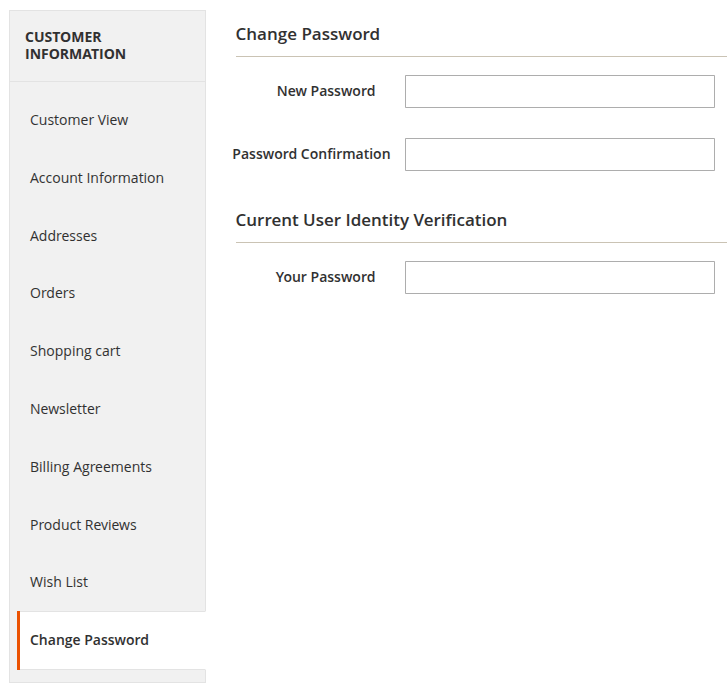
This module adds a new tab to the customer edit page in the Magento admin panel, allowing administrators to change the customer's password directly from there.
Installation details
- Run
composer require yellowteak/magento2-change-customer-password - Run
php bin/magento module:enable YellowTeak_ChangeCustomerPassword
Configuration
Before the new tab will be visible in the customer edit page, you need to enable the module in the configuration settings. To do this, follow these steps:
- Log in to the Magento admin panel.
- Navigate to
Stores > Configuration > YellowTeak > Change Customer Password. - Set
EnabledtoYes. - Click
Save Config. - Flush the cache by navigating to
System > Cache Managementand clickingFlush Magento Cache.
Usage
Once the module is enabled, you can change a customer's password by following these steps:
- Log in to the Magento admin panel.
- Navigate to
Customers > All Customers. - Click on the customer whose password you want to change.
- Click on the
Change Passwordtab. - Enter the new password in the
New PasswordandPassword Confirmationfield. - For security reasons, you will also need to enter your own admin password in the
Your Passwordfield to confirm the change. - Click
Saveto update the customer's password.
This content is fetched directly from the module's GitHub repository. We are not the authors of this content and take no responsibility for its accuracy, completeness, or any consequences arising from its use.