Module Debug Toolbar
Adds a debug toolbar to Magento 2, displaying request/response data, SQL queries, profiler information, layout details, and cached items. Helps developers debug by providing insights into application execution.
Build Tests
Code Quality
Release Discipline
Release history audited up to v7.0.3
Tested on Magento 2.4.9
Recent Test History
Each release is tested against the latest Magento version at that time.
Top Contributors
View Leaderboard
Share This Module's Status
README
Loaded from GitHubSmile Debug Toolbar for Magento 2
Description
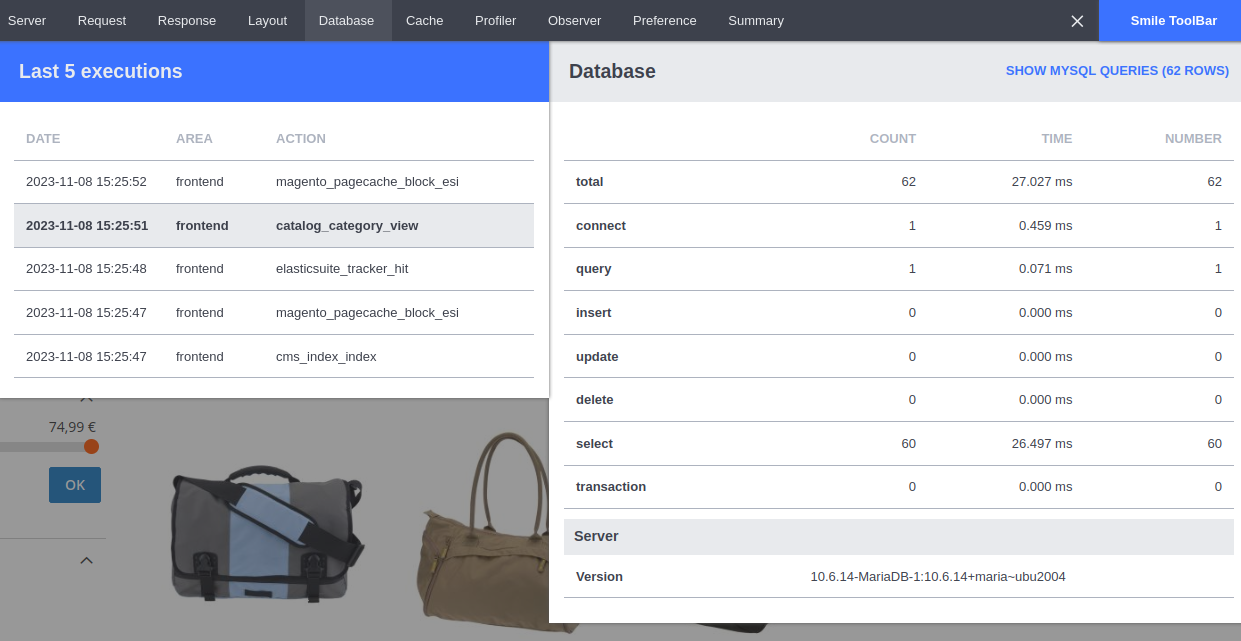
This module adds a Debug Toolbar in Magento 2. The toolbar displays useful information about the last executions (including ajax requests, rest API and graphql):
- HTTP Request/response
- SQL queries (with the PHP trace for each query)
- Profiler information (with timers)
- Layout information
- Cached items
- Plugins/observers that were triggered
Installation
To install the module:
- Execute the following command at the root of the Magento installation:
composer require --dev smile/module-debug-toolbar - Enable the module:
bin/magento module:enable Smile_DebugToolbar bin/magento setup:upgrade - Enable the toolbar:
bin/magento config:set smile_debugtoolbar/configuration/enabled 1
Configuration
The configuration of the module is available in the section Smile > Smile DebugToolbar of the admin area:
You can:
- Enable / disable the debug toolbar (default: disabled)
- Show / hide the debug toolbar in the admin area (default: hidden)
- Choose the number of last executions to save and display in the toolbar (default: 5)
Uninstallation
Unfortunately, the module cannot be automatically uninstalled, because Magento doesn't support uninstallation of dev packages out of the box.
To uninstall the module, follow these steps:
- In app/etc/env.php, remove the key
db.connection.default.profilerfrom the array if it is defined. - Run the following commands:
bin/magento module:disable Smile_DebugToolbar composer remove --dev smile/module-debug-toolbar bin/magento setup:upgrade - [Optional] Remove the directory "var/smile_toolbar".
Customizing the Toolbar
It is possible to add new zones to the toolbar (e.g. to display project-specific data). This is documented here.
Contributing
You can contribute to this module by submitting issues or pull requests.
For more details, please take a look at the contribution guidelines.
License
This module is licensed under the Eclipse Public License - v 2.0.
Changelog
All notable changes are recorded in this changelog.
Contact
Smile Technical Office dirtech@smile.fr
This content is fetched directly from the module's GitHub repository. We are not the authors of this content and take no responsibility for its accuracy, completeness, or any consequences arising from its use.